This is one of those times where I feel like I’ve been living under a rock.
Where Did This Come From?
I’m not sure when this project fired up, but it’s the kind of thing that I feell like I should have picked up on sooner. Oh well! At least I got to the party. And it is a party.
I’ve gone on at length about Winlink and the many and varied ways to send email over RF. My current GoTo system has been pat with a side helping of VARAHF most days running under a CrossOver (WINE) setup with rigctld as the backbone. Running this on my Mac Just Works™ and it makes me happy. pat on the command line is a dream. Easy to use, quick to configure, and available on any platform in my shack (mobile or otherwise).
For me, a person who is comfortable with the command line and rigctld and all of the other little bits and pieces that go into this process of getting an email sent, this isn’t a significant hill to climb. In fact, pat with its web UI is really, really easy to use. I recommend it all the time. I also spend some time putting together scripts for people that help them get this stuff running with a single command rather than remembering the other stuff. Top that off with a healthy converstation around modems and, well, yeah. In 2026 Winlink still isn’t a slam dunk. That’s a problem.
Enter MacWinlink!
The Promise
Explaining rigctld and rigctl isn’t easy. I do know that when I go to search the web for how to use it, my blog comes up pretty quickly. Yay me! But that also tells me that this isn’t a utility most people live in - at least I certainly don’t! We get it working and then forget what we did to make that one thing work that one time when we were using that other rig on the laptop at the club site and… It’s 2026. We should be able to do better. It feels like this is where MacWinlink is going.
Between the application itself and MacWinlink Helper the user gets everything they need to configure the system and run it within the very comfortable user interface guidelines that Apple has created. That’s huge. Please do not discount that. Ease of use shouldn’t be something that is laughed at or derided. It should be celebrated. I get the sense that’s where this application is heading even if it isn’t quite there yet.
The General Flow
The Helper application can be configured to manage all of the modems. That includes VARA, ARDOP, and even Direwolf. This is The Big Deal. It also can set up its own rigctld session, connect to an existing rigctld process, or go directly to the radio. This lowers the barrier to entry significantly, in my opinion.
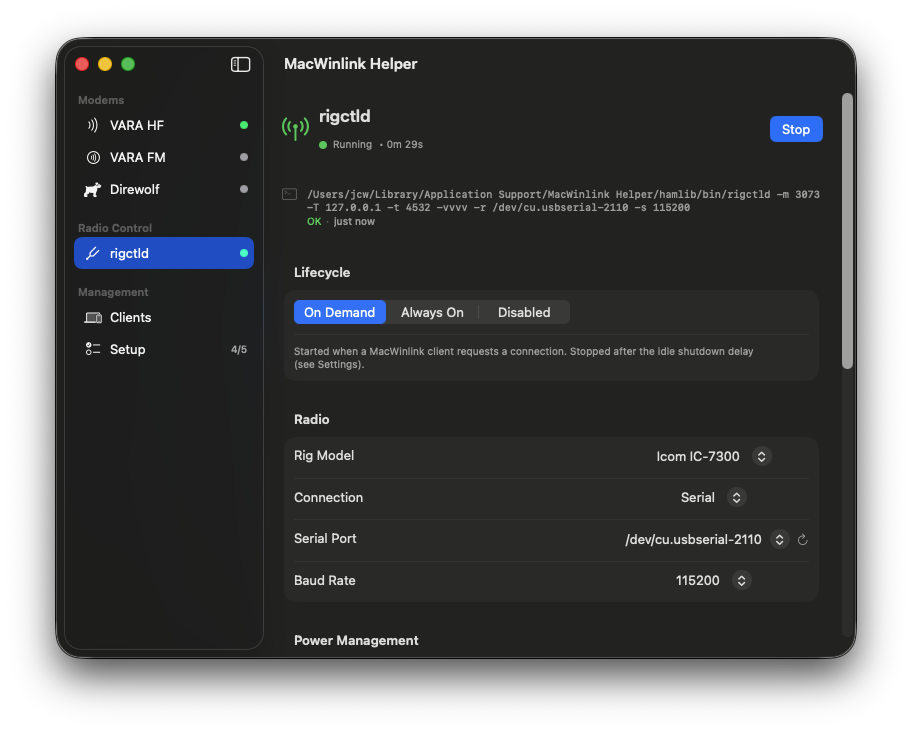
Me? I always have my own rigctld running, so I just pointed the config at that and it worked. I had it launch VARA HF and I put in all of the settings (audio devices, license code, etc.) and it handled the rest without me having to invoke CrossOver at all. For my setup, that’s simplifying things and I like that.
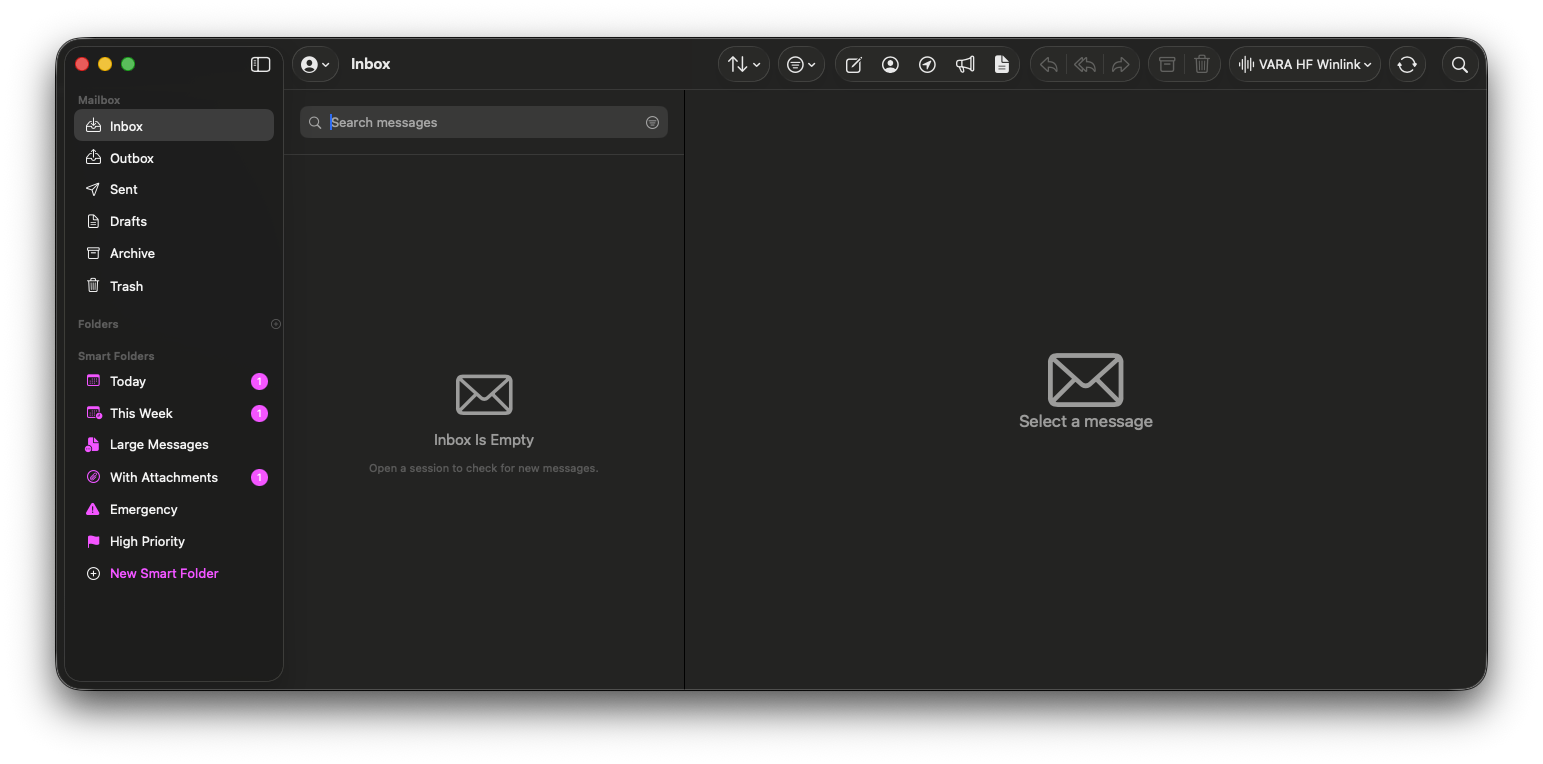
With the Helper running, the user can dive into MacWinlink and do exactly what they should expect: draft an email and send it. There are templates and forms already populated. I sent an IC-213 to Winlink Wednesday just today, in fact. The experience feels like using Apple Mail. The forms templates still feel like the clunky HTML constructs that they are, but they’re housed in an interface that makes them easier to use. The template interface is very much like what pat does.
The rest of it? It’s Just Email.
Sending / Receiving
For today’s Winlink Wednesday, I clicked the little send icon after composing the email with template attachment and the application pulled up a VARA HF window. It asked me to select a gateway.
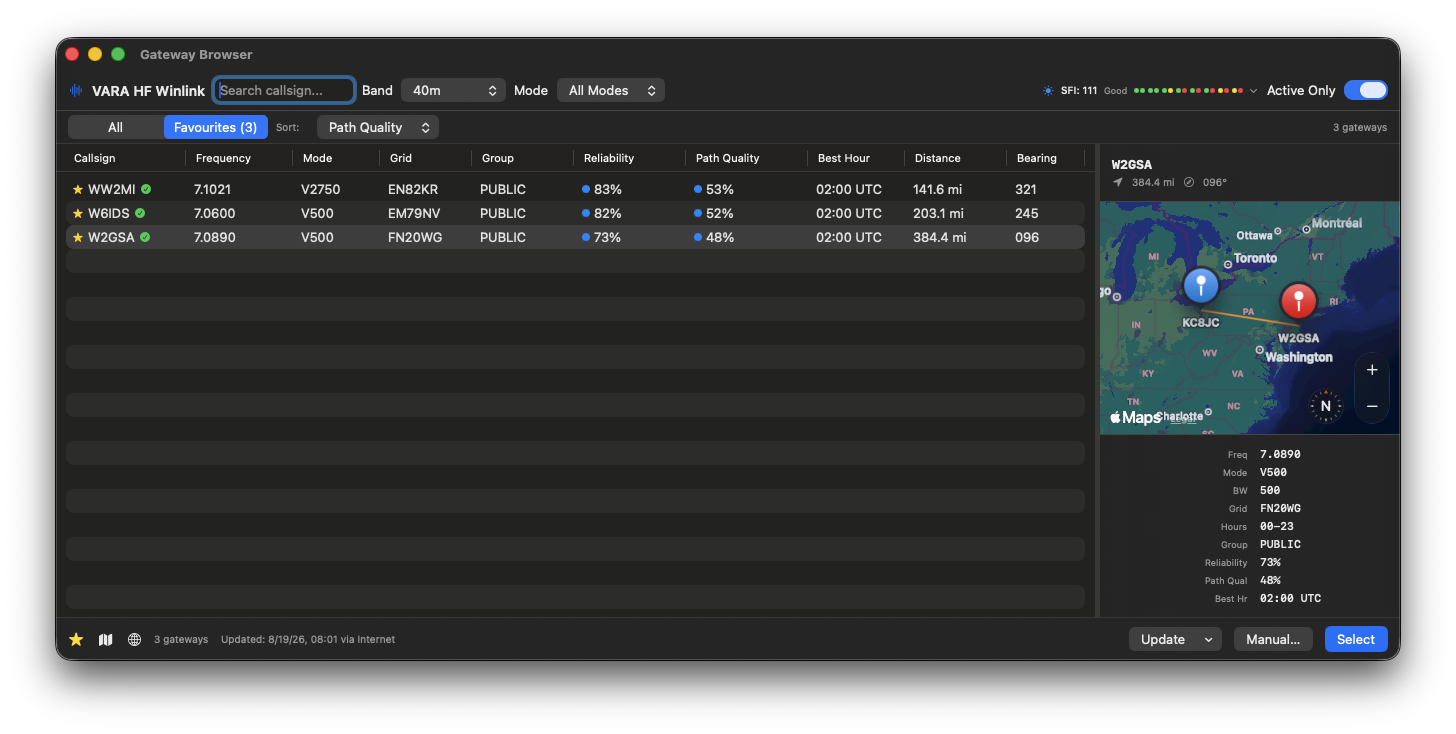
After selecting one that I knew was going to be good, it started the session. It connected, sent my mail, saw that I didn’t have any waiting, and ended.
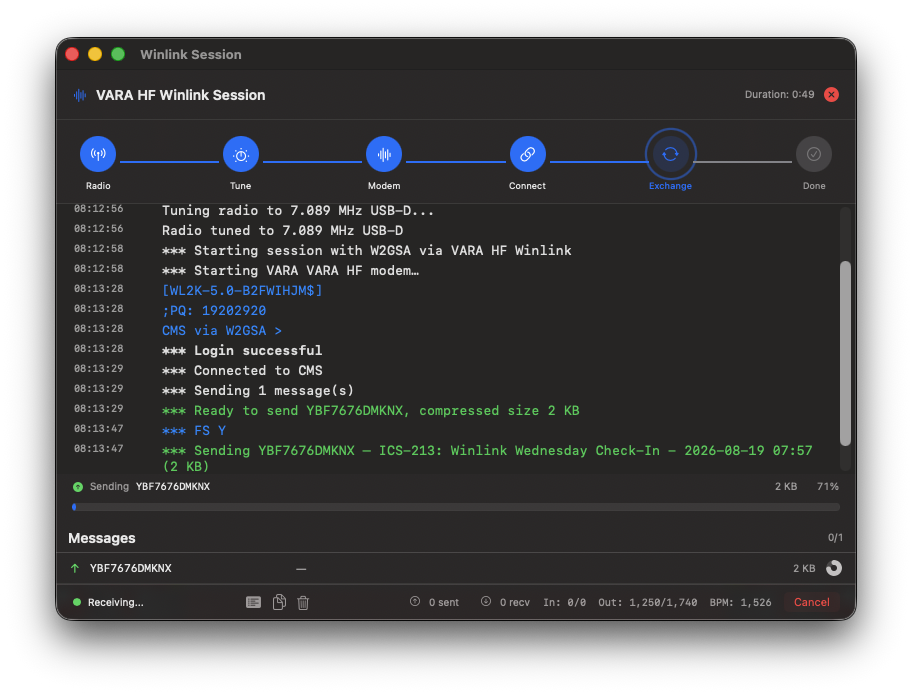
That’s about it. And that’s all it should be. When it was done, it pounded out my callsign in CW as instructed and I closed the window.
Getting It On Your Mac
There are two repositories and one of them seems to be private. There is a repo that has binaries for beta testers. That’s everyone right now, so this is where you find those:
https://github.com/jjones9527/macwinlink-releases/releases
Pull them down, install them, fight with MacOS because it didn’t come from the app store or a “Known Developer” and get on with it. Yeah, in the latest OS you have to go into the Privacy settings, scroll all the way to the bottom and say, “Yes, I did in fact mean to do the thing I did.” You’ll have to do that for MacWinlink and for the helper application. Not the end of the world, but c’mon Apple. I know what I’m doing until proven otherwise.
Simplicity
I’m going to indulge here a little bit because I did have some back and forth on Mastodon where there is always great conversation and a lot of good thoughts on the hobby and what we do with it. A lot of hay is made over Winlink and how critical it is in a disaster. I’m not going to engage with that on the surface. I’m going to peel that onion one layer.
Something that is critical needs to be simple. A fire extinguisher does one thing. It does it very well in the hands of someone who has been shown how to use it. The fundamentals of a fire extinguisher aren’t complicated though using one correctly does require a bit of practice. Not years of honing technique, but doing it once to see how it really works.
Winlink isn’t a fire extinguisher. It’s fragile. And I don’t mean the server infrastructure, I mean the local stations that send traffic.
I wrote and deleted a bunch of stuff about operating systems here. I realized it’s not germane. I’m on a Mac and this is a Mac application. We’ll stay on topic for a minute (you’re welcome).
Winlink on the Mac is not simple. I’ve mentioned rigctld which takes a minute to learn. I’ve also mentioned CrossOver as a way to run VARA. That’s non-zero investment of time and money. ARDOP requires a lot of mojo to get running on the Mac. What MacWinlink does well is package all of these things so that it can manage it for the user. Find your way through the config once and everything should work every time. I know that as a person who writes code and messes around with other people’s code I’m always screwing up something on my system that makes a script fail. MacWinlink gets me out of my own way and let’s me let things work. That’s not nothing. That’s progress.
Now, I’m not going to say it’s polished enough that I can talk a person through configuration over the phone. Not yet. But it’s headed that way. And it really does feel like they are moving toward a model where the helper app disappears into the application itself. If/when that arrives? We’ll be living the good life!
I’ll also toss in that an app like this, built in a modern framework with modern sensibilities, should be ready for accessibility features used by the OS and implemented in the framework. I have no way to evaluate that myself, but I hope someone out there is paying attention to that facet.
Ignore The Following Criticism (Please)
Also? I’m not one to criticize the naming of projects, but this one is something. All of the ham software that has “Win” in the name is generally irritating and having been a person who had O’Reilly books and plenty of “Learn C++ in 24 Hours!” books as well, I know exactly where that originates. But… I mean… Mac Win Link? What are we doing?
Onward!
Final
If you’re a Mac user and participate any Winlink activities, you should just go download it and play with it. It’s ready for a user like me who holds everything together with duct tape and bash scripts so it’s probably ready for you too.
It’s also imperative to track this project simply to see that there is progress being made in software for this hobby. We don’t have to be stranded in a Win32 mindset. There are people moving things forward and this is a good example of that.
Thanks for reading along and 73!