<?xml version="1.0" encoding="utf-8"?><feed xmlns="http://www.w3.org/2005/Atom" ><generator uri="https://jekyllrb.com/" version="4.4.1">Jekyll</generator><link href="https://www.kc8jc.com/feed.xml" rel="self" type="application/atom+xml" /><link href="https://www.kc8jc.com/" rel="alternate" type="text/html" /><updated>2026-07-08T15:36:41-04:00</updated><id>https://www.kc8jc.com/feed.xml</id><title type="html">KC8JC</title><subtitle>Portable operations, POTA activations, CW, FT8, and field adventures from KC8JC — licensed since 2017.</subtitle><author><name>KC8JC</name></author><entry><title type="html">The Putikeeg Morse Mini Paddles</title><link href="https://www.kc8jc.com/2026/07/08/the-putikeeg-morse-mini-paddles/" rel="alternate" type="text/html" title="The Putikeeg Morse Mini Paddles" /><published>2026-07-08T00:00:00-04:00</published><updated>2026-07-08T00:00:00-04:00</updated><id>https://www.kc8jc.com/2026/07/08/the-putikeeg-morse-mini-paddles</id><content type="html" xml:base="https://www.kc8jc.com/2026/07/08/the-putikeeg-morse-mini-paddles/"><![CDATA[<p>I’ve been using this set of paddles for my activations for a while now and I just thought I’d toss this out there.</p>

<figure><img src="/assets/images/2026/07/08-Jul-2026-putikeeg.png" alt="The Putikeeg CW Keyer Morse Mini" /><figcaption>The Putikeeg CW Keyer Morse Mini</figcaption></figure>

<p>I picked this little guy up because I saw a bunch of operators on Mastodon were using it. At about $60US it wasn’t that much of a gamble. And frankly, after the scare I had of thinking I’d lost my Begali in the field, I was looking for something that was solid enough, but wouldn’t make me lose my mind if I lost it. This fits into that niche very nicely.</p>

<p>I’ve got other keys that I use in the field. I have some from CW Morse and they’re good too. Lightweight, plastic, easy to work on in the field. But even the metal key I got from them feels a bit lighter than what I’d like. I asked a couple of questions on Mastodon and then hit the buy button. I didn’t quite know what to expect, but this little guy is pretty great.</p>

<p>I have a metal base that I carry around with me and the magnetic legs on the Putikeeg attach in a serious fashion. That thing really isn’t going anywhere. I like that a lot.</p>

<p>The keys take a slap well, but don’t require it. It’s very adjustable and I haven’t found myself fiddling with it too much. I have it Set and am clearly into the Forget portion of Set It And Forget It.</p>

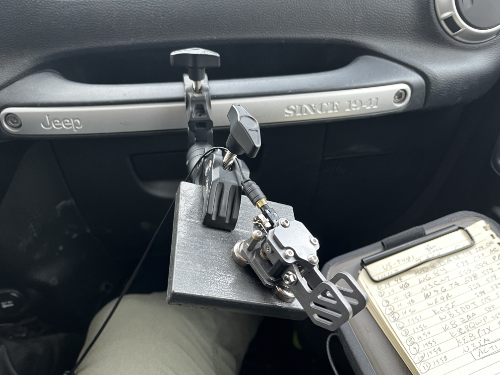
<p>For my activations from the Jeep, I’ve used a crab clamp to hold the metal base and then attach the key to that. It works really well. It also works well on  table top with the base or even held in the non-keying hand. I’ve dropped it a few times, tossed it into a bag loose, and probably given it more abuse than it deserves but it hasn’t seemed to mind. That said, I gave it a better home after reading a <a href="https://qrper.com/2026/07/wb5dyg-when-portable-is-all-ya-got/">Field Report on QRPer.com</a> and seeing a picture of the foam from the case’s box that it ships in dropped into a Pelican case.</p>

<figure><img src="/assets/images/2026/07/08-Jul-2026-In-Case.png" alt="Putikeeg paddles in foam in a Pelican case." /><figcaption>Putikeeg paddles in foam in a Pelican case.</figcaption></figure>

<figure><img src="/assets/images/2026/07/08-Jul-2026-pelican.png" alt="Black Pelican 1010 case." /><figcaption>Black Pelican 1010 case.</figcaption></figure>

<p>When I think about some of the things I use for field operations, I tend to go for High Value. Sometimes I pay a little more for something that is just a touch nicer than a lower cost item, but I turn that on its side. Does it really cost more if it delivers on reducing friction or improved performance in some domain? In the case of this set of paddles, I think it is more than worth it at the current price. I’m quite pleased.</p>

<p>This isn’t much of a review and No, I wasn’t compensated for it. I’ve just seen people ask recently about this little dude and I want to say that Yes, You should.</p>

<p>73 and thanks for reading along!</p>]]></content><author><name>KC8JC</name></author><category term="CW" /><category term="Gear" /><summary type="html"><![CDATA[I’ve been using this set of paddles for my activations for a while now and I just thought I’d toss this out there.]]></summary></entry><entry><title type="html">Sleeping Bear Dunes 2026</title><link href="https://www.kc8jc.com/2026/06/29/sleeping-bear-dunes-2026/" rel="alternate" type="text/html" title="Sleeping Bear Dunes 2026" /><published>2026-06-29T00:00:00-04:00</published><updated>2026-06-29T00:00:00-04:00</updated><id>https://www.kc8jc.com/2026/06/29/sleeping-bear-dunes-2026</id><content type="html" xml:base="https://www.kc8jc.com/2026/06/29/sleeping-bear-dunes-2026/"><![CDATA[<p>We took a week to camp on the shores of Lake Michigan and I can’t recommend it enough.</p>

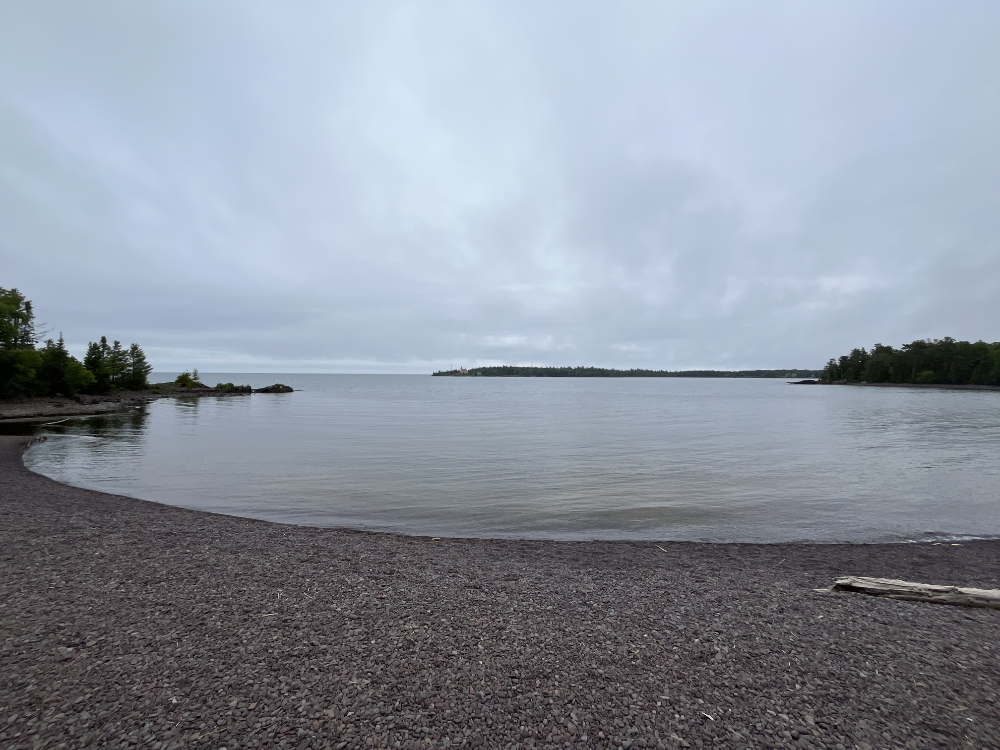
<figure><img src="/assets/images/2026/06/Cover-29-Jun-2026.png" alt="The beach of Lake Michigan at Sleeping Bear Dunes National Lakeshore" /><figcaption>The beach of Lake Michigan at Sleeping Bear Dunes National Lakeshore</figcaption></figure>

<p>We loaded up our weird Australian camper and pulled it north to Sleeping Bear Dunes National Lakeshore in late June. It was a beautiful place to be. The campsite in the D H Day Campground was exquisite. The weather was in the 50s dF at night and up to 67df or so during the day. Perfect for hiking and cycling. If you’re my daughter, it’s even prime weather for swimming in a Great Lake that doesn’t get all that warm.</p>

<h2 id="gear-talk">Gear Talk!</h2>
<p>Of course, since we were camping in a property run by the National Park Service (US-0767 for those who care) I brought along some radio gear. Unlike my normal camping operation, I did things a little differently. We were totally off the grid for this one. No shore power at all, so I left the Hardrock-50 at home. Instead, I took along my IC-705 (which surprises no one) and my Penntek TR-45L. Why the Penntek?</p>

<p>Have you seen this thing? Are you asking me that for real?</p>

<figure><img src="/assets/images/2026/06/29-Jun-2026-TR45L.jpeg" alt="A decent close-up of the TR-45L resting on a backpack on the beach with the author's leg in the shot." /><figcaption>A decent close-up of the TR-45L resting on a backpack on the beach with the author's leg in the shot.</figcaption></figure>

<p>I’ve talked a bit about this rig in the past and the fact remains that it is absolutely wonderful to work a radio that has everything controlled with knobs and switches. Real knobs and real switches. No submenus. No nonsense. The speaker in it is solid but it really shines with headphones. The receiver is astonishingly good and the darned thing just gets out when it needs to.</p>

<p>The version that I have does have the Z-match option which we’ll get to in a second. It also has an internal battery that I added after I bought it. It’s great! Perfect for taking to the beach.</p>

<figure><img src="/assets/images/2026/06/29-Jun-2026-Beach-Radio.png" alt="The TR-45L resting on a backpack. The AX1 antenna is on the right along with a log book in the foreground. There is a big white dude's foot with sandal in the frame as well - regrettably." /><figcaption>The TR-45L resting on a backpack. The AX1 antenna is on the right along with a log book in the foreground. There is a big white dude's foot with sandal in the frame as well - regrettably.</figcaption></figure>

<p>The Chameleon whip and spike were the setup for camp but I took the AX1 along so that I wouldn’t be encumbered or get in anyone’s way if I decided to work other places in the park - which I did (see photos above).</p>

<h2 id="modes">Modes</h2>
<p>I really enjoy working CW. It’s my POTA mode of choice because it’s quiet and doesn’t disturb anyone in the area. In fact, if I have headphones on, you’re not likely to know I’m up to anything other than staring off into the distance or scratching something in a notebook. That’s how I like my activations.</p>

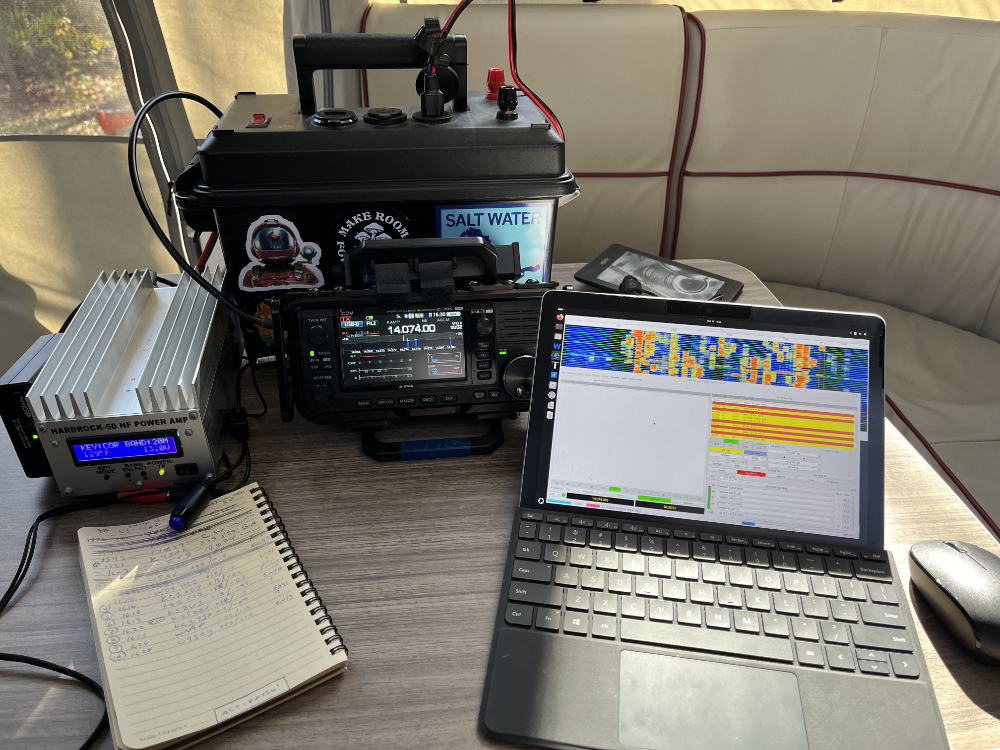
<p>That said, there’s a time and a place for everything. I was in a couple of situations where the bands were absolute garbage and I wanted to get my daily activation knocked out. I dusted off the Surface GO 2 tablet and fired up WSJT-X. It was definitely the right thing to do.</p>

<h2 id="ft8">FT8</h2>
<p>This was my gateway mode. Living where I lived and having no concept of things like POTA or even mobile operation when I first came to the hobby, FT8 was a great way to make contacts in a high noise environment while I learned the rules. Everyone (myself included) screams, “Just Get On The Air!!!” and that’s great advice! But for some folks, the thought of making a “mistake” or “ruining” a contact for another operator is a lot to tackle. FT8 (and other digital modes, to be fair) take the edge off. It’s a great beginner mode, perfect for less than amazing conditions, and fun. What’s not to like?</p>

<p>So I did a pile of it. Mostly in the late evening, which was early morning UTC, so that I could sneak in a little radioactivity while everyone else was otherwise occupied with sleeping or reading or whatever.</p>

<h2 id="learning-things">Learning Things</h2>
<p>I mentioned the Z-match on the TR-45L. I built one from a kit once, used it a couple of times, and put it in my bag for emergencies. Part of taking the TR-45L along with me was to force myself to really understand how to get a match with that piece of gear. As with most things Ham Radio, I built it up to be bigger than it was. I don’t remember the video or I would link it, but the trick seems to be this: adjust one knob until you drop your SWR and then tweak the other knob watching to be sure that the SWR drops again. Repeat that process until you have a satisfactory match. In my case, that’s when the TR-45L’s angry red light goes away and the cool needle gauge reads something nice and low.</p>

<p>Me? I start with both knobs in the middle and fiddle with things from there. I’m sure there’s a more science-y way to do it, but that has worked really well for me and it’s easy. Not that anything about the process is very difficult, but you do need to remember to turn down the power and work in short bursts. We don’t want to burn anything out, right?</p>

<p>I would call myself quite accomplished with this piece of tech as I was changing bands a lot while using the whip. Not only were conditions rough, they were rough and volatile.</p>

<h2 id="getting-out">Getting Out</h2>
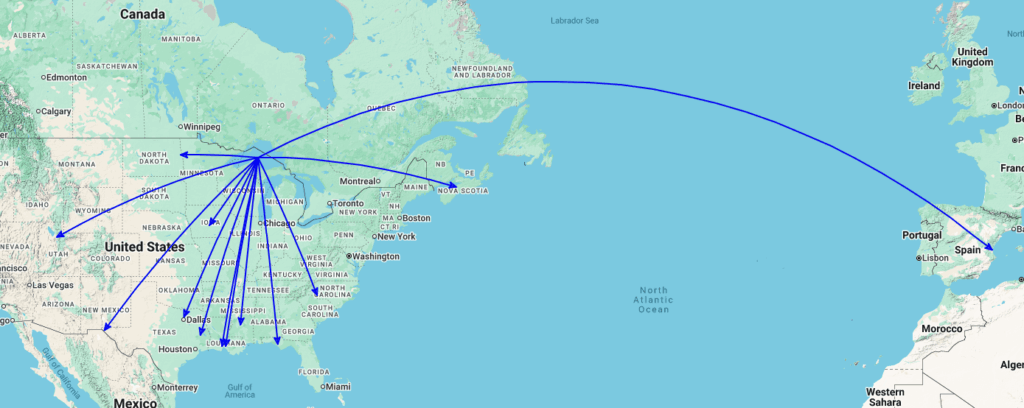
<p>I was definitely getting out on the beach with that little unit running well under 5 watts.</p>

<figure><img src="/assets/images/2026/06/29-Jun-2026-RBN.png" alt="The Reverse Beacon Network webpage showing my callsign being picked up a good distance from where I was sitting." /><figcaption>The Reverse Beacon Network webpage showing my callsign being picked up a good distance from where I was sitting.</figcaption></figure>

<p>But the activations were slow. Nothing wrong with that! For the most part, I didn’t have anything else to do or anywhere else to be. That’s the beauty of getting out to a place like that. If I wasn’t hiking or on my fat bike, I could be enjoying some radio fun.</p>

<h2 id="qso-map">QSO Map</h2>
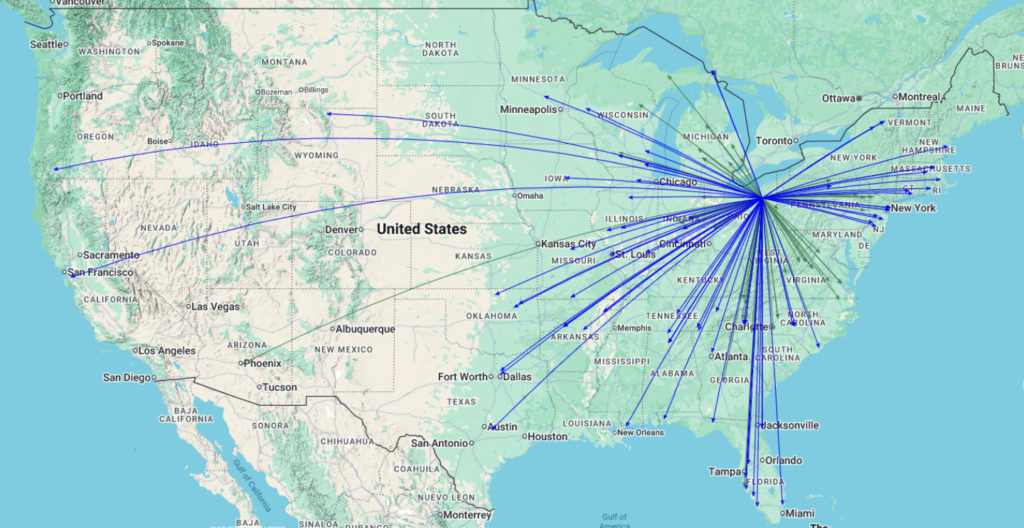
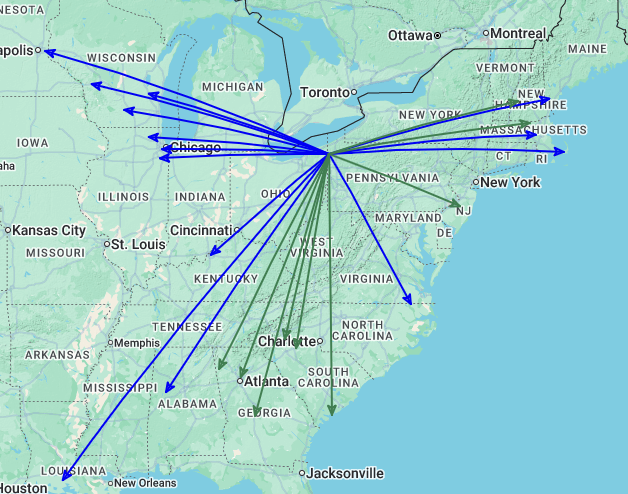
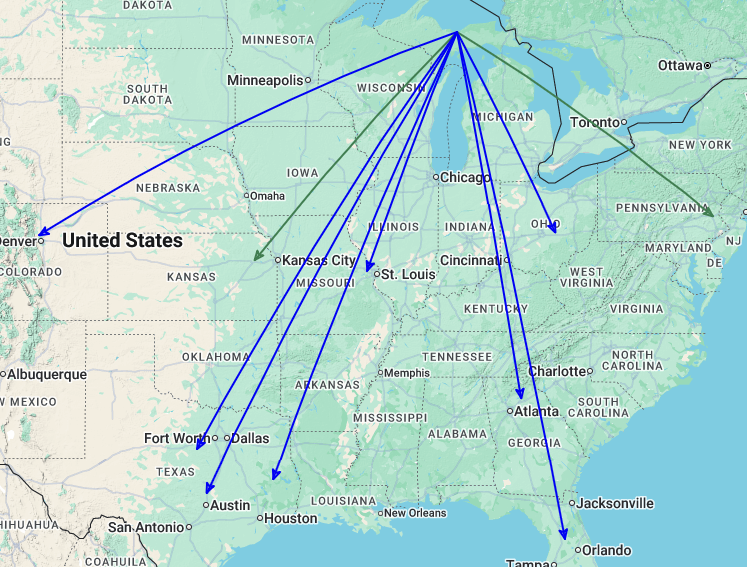
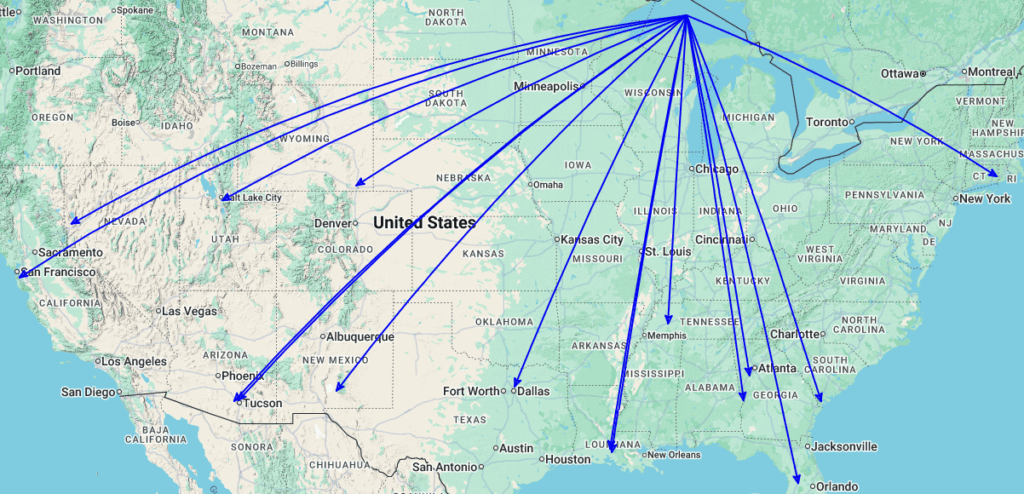
<p>Here’s what it looked like. All 5 activations piled up on top of one another.</p>

<figure><img src="/assets/images/2026/06/QSOMap-29-Jun-2026.png" alt="QSO Map for the activation of US-0767 by KC8JC on 21-25 June 2026." /><figcaption>QSO Map for the activation of US-0767 by KC8JC on 21-25 June 2026.</figcaption></figure>

<h2 id="final">Final</h2>
<p>We ended up bugging out a day early due to heavy rain. We had easily 2.5” of standing water in the campsite after rain that started overnight and wasn’t going to stop that day. While there’s no bad weather (only insufficient gear), the fun to work ratio wasn’t aligned for us. No biggie. We got home with time to put things away and we’d had a great time. Can’t recommend that park enough!</p>

<p>73 and thanks for reading!</p>

<figure><img src="/assets/images/2026/06/29-Jun-2026-Dunes.png" alt="Grass and dunes with Lake Michigan in the distance." /><figcaption>Grass and dunes with Lake Michigan in the distance.</figcaption></figure>]]></content><author><name>KC8JC</name></author><category term="POTA Field Report" /><category term="Camping" /><summary type="html"><![CDATA[We took a week to camp on the shores of Lake Michigan and I can’t recommend it enough.]]></summary></entry><entry><title type="html">Into The Mesh: Part 1</title><link href="https://www.kc8jc.com/2026/06/18/into-the-mesh-part-1/" rel="alternate" type="text/html" title="Into The Mesh: Part 1" /><published>2026-06-18T00:00:00-04:00</published><updated>2026-06-18T00:00:00-04:00</updated><id>https://www.kc8jc.com/2026/06/18/into-the-mesh-part-1</id><content type="html" xml:base="https://www.kc8jc.com/2026/06/18/into-the-mesh-part-1/"><![CDATA[<p>So I got curious. That’s on me.</p>

<figure><img src="/assets/images/2026/06/18-Jun-2026-MissionControl.png" alt="A Heltec ESP32 LoRa v3 module in a Heltec branded enclosure sitting on the back of a computer monitor that is adorned with strange things like an old name tag and a lanyard from a concert." /><figcaption>A Heltec ESP32 LoRa v3 module in a Heltec branded enclosure sitting on the back of a computer monitor that is adorned with strange things like an old name tag and a lanyard from a concert.</figcaption></figure>

<p>The problem with the Heltec ESP32 LoRa v3 development boards is that they come with WiFi, BLE, an OLED screen built in, and an already wired up space for a hobby battery. And to exacerbate that, they’re about $20 each right now in the USA. So if you happened to get the itch to experiment with <a href="https://meshtastic.org">Meshtastic</a> it’s not really a huge outlay of cash and the time it takes to get a node up and running is pretty minimal. Once you figure out how to do it.</p>

<h2 id="why">Why?</h2>
<p>There’s no good answer. Like many things in Ham Radio, you can try to make a case that anything that doesn’t involve the internet would be good in an emergency. A self-sustaining mesh network of nodes that can fit in your pocket or ride on your backpack makes a great story. I’m a couple of weeks in on this and I’m not sold. I think if you had a small group of people and enough gear to support it, then yeah, these might be useful. But the real reason to tinker with these things is, well, the tinkering part. So let’s be honest about that from the jump, shall we?</p>

<p>I picked up three of these things in total just to mess around with and see what they could do. <em>Curiosity is a good enough reason</em>.</p>

<h2 id="the-gear">The Gear</h2>
<p>OK. I’ve already called out the Heltec v3 units. I also grabbed some 3000mAh 3.7v lithium batteries. The ones I got have a neat little plug that magically fits the dev board so no soldering or crimping or nonsense there at all. Nice! Then I picked up a couple of cheap antennas. They do perform better than the little stubs that come with the boards themselves. Again, very inexpensive.</p>

<p>With the guts more or less assembled, we must as good Amateur Operators come up with a reason to fire up the 3d Printer. That was easy enough! The enclosure that I settled on was this little guy: <a href="https://www.printables.com/model/1515974-meshtastic-heltec-v3-case">https://www.printables.com/model/1515974-meshtastic-heltec-v3-case</a>. Sure is pretty! I made two of them in red because I had a lot of red PLA lying around.</p>

<p>Also, I made the bottom piece of the model deeper because I knew it was going to be tight in there with the battery and anything else I might want to solder on.</p>

<figure><img src="/assets/images/2026/06/18-Jun-2026-RedNode.png" alt="A bright red 3d printed enclosure revealing the OLED on a Heltec v3. It has a decent black antenna and there are Dymo labels with KC8JC and AD40 printed on them to identify the node." /><figcaption>A bright red 3d printed enclosure revealing the OLED on a Heltec v3. It has a decent black antenna and there are Dymo labels with KC8JC and AD40 printed on them to identify the node.</figcaption></figure>

<p>I also picked up a couple of GT-U7 GPS modules and a couple of BME280 environmental sensors. I have a lot to say about those that will probably betray my inexperience with such things. I’m an amateur. It’s all a part of the blog. I’m not going to be embarassed of that. But I will have a lot to say.</p>

<h2 id="the-software">The Software</h2>
<p>The good news is, you can plug the ESP32 into your computer, launch Chrome (<em>GAG</em>) and navigate to <a href="https://flasher.meshtastic.org/">https://flasher.meshtastic.org/</a> which is a really great web application. It will find the device and flash it with whatever firmware you choose. I went with the Alpha stuff because I like to live on the edge (and if I didn’t like it re-flashing it is low effort). For what it’s worth, I haven’t found any reason to change just yet.</p>

<p>With that flashed, you can download the Meshtastic app to your iOS or Android device <strong>or</strong> to your computer and pair the device using Bluetooth or USB right out of the box.</p>

<p>In my opinion the configuration of the apps themselves is a bit…um…underdocumented? There are a lot of forced options in the UI and things have strange intevals that don’t lend themselves to testing. That’s all well and good because it drove me to the command line and my latest <strong>Don Quixote Python Monstrosity</strong>. The apps are fine. They keep things simple but they lack granularity and configurability in some places and give too many opportunities to screw things up in others. It’s a strangely typical “Softare By Engineers For Engineers But Pretending To Be For Regular People” kind of feeling. I’m not sure <em>who</em> the Meshtastic target audience is honestly, but I will likely write up some suggestions for the developers to help address the needs of people who troubleshoot these things and people who are just looking for field communications around camp.</p>

<p><em>In any case</em>, all you really have to do is set a region. Everything else <em>could</em> stay as it is.</p>

<p>With the device paired to your app you get to start the most important part of the Meshtastic experience: <strong>Waiting</strong>.</p>

<h2 id="lots-of-waiting">Lots Of Waiting</h2>
<p>If you are a person who needs instant gratification, Meshtastic is not for you. The units need to sit and cycle a few times to see what’s going on in the neighborhood. I was under the impression that there wasn’t much going on in my area, but I found node after node popping up as I went through my day occasionally checking in on the status of things. There were hops all the way out to New York state from my location. That’s pretty impressive for 5 hops! I will readily admit I have no idea what kind of infrastructure is out there, but that was pretty cool.</p>

<p>I hesitated to put out a message. The thing is, there are open channels that anyone can message that will be pushed to all nodes. Cool! But it was really, really quiet. I thought about it a bit and then likened it to the silent repeater. There are probably a ton of people listening and no one talking. So I put out a message to see if anyone could hear me. They could! That was super exciting! But the chatter quickly died down.</p>

<p>I watched as the map spread. More nodes. More position data. More telemetry. Weather data. Little bits and pieces finding their way to me over the air. There were even some nodes that appeared to be very close to me as reported by their position data. Certainly some folks near the local University and maybe even a couple of radio operators down the way who have callsigns in their node names. I’m also guessing that there were quite a few mobile nodes just blowing through. It was fun to watch!</p>

<p>But as with all things ham radio, that’s not good enough.</p>

<h2 id="where-are-we-gps-time">Where Are We? GPS Time!</h2>
<p>Since it is far too easy to put one of these little guys into a case, attach it to a battery, and call it done I decided to complicate things. I started with the GT-U7 GPS module.
This GPS module is the one that is referenced most frequently in the Meshtastic documentation. It’s a solid performer and isn’t much to wire up. Two pins for data and two pins for power. No biggie. Well, I’ll admit to a couple of oopsies in the spirit of helping everyone else out.</p>

<p>First, on the unit where I was later to add an environmental sensor, I noticed that using a particular pin put me really close to the ribbon for the OLED. OK. Fine. Use any other pin, right? Well, any pin other than the reserved ones that I didn’t look up. Let’s say, oh, pin 21 which is the reset for the display. When you wire up an incoming data line to the reset of the display, well, the display goes away. I moved it to pin 20 and life was good.</p>

<p><strong>Wisdom:</strong> The big thing to remember here is that the GPS pins you choose need to be configured in the app. This means that if you delete the app from your phone in an attempt to reset a few things the hard way, you will lose those pin settings and it might come to pass that you forget to set the pins and you wind up tearing down the unit only to discover that it was a configuration issue and not hardware. That’s something that could happen. If you’re not careful.</p>

<p><em>Sigh.</em></p>

<p>With all of the pins assigned correctly and the connections made on the hardware, positioning has been perfect. The units won’t grab position in my home office which is a faraday cage of sorts anyway but they work fine in the open spaces of the world. I can sit and watch the position data roll in from the node I have permanently attached to my desktop. More on that later.</p>

<h2 id="timethat-was-weird">Time…That Was Weird</h2>
<p>When I first got the GPS units attached there was a very strange behavior. The time on the units was off. Not by hours - that would have been easy to diagnose and fix - but by 21 minutes. Or 17 minutes. Or 47 minutes. It was all over the place. However, if I disabled GPS in the configuration, the time defaulted to the attached device and everything was fine. This was a bit frustrating as reporting the correct time on the node display seems like a table stakes feature. And, yes, I made sure that it had acquired sattelites and was reporting a correct position.</p>

<p>So I employed my new Meshtastic Problem Solving Technique™: I ignored it for a few hours and, that’s right, it <em>magically</em> fixed itself. No change to config. No change to hardware. No change to number of sattelites acquired.</p>

<p>I am absolutely certain that there is someone out there that can explain this. It hasn’t been a problem in quite some time, so while I’d love to close the circuit, I’m past the point where it’s important.</p>

<h2 id="the-environment">The Environment</h2>
<p>I installed a BME280 into one of the nodes. It does temperature (sorta), pressure, and humidity. I’ve learned, thanks to some smart kids on Mastodon, that the temperature sensor isn’t very accurate and really only exists to serve the pressure and humidity sensors which are. I can live with that.</p>

<p>I have a feeling that the sensor I installed into the node was faulty. It reported telemetry for some time and then started to fail. The temperature was off by 7dF rather than 0.5dC and it’s, well, flaky. I got it in a two-pack so I will think about what I want to do about it. I will probably end up making a node that sits outside and gathers that data. If I do that, I will print up a different case and make accomodations for that sensor so that it can be successful. Jamming it into a little box with the other components seems to be ill-advised.</p>

<p>An interesting note is that if a node picks up the environmental data from another node, it will display it on the local OLED. I find that useful and neat!</p>

<p><strong>Wisdom:</strong> Read the product description. Get the 3.3v one and not the 5v because, well, if you’re running things on a 3.7v battery…yeah…you get it.</p>

<h2 id="a-detail-or-two">A Detail Or Two</h2>
<p>There is an option in the software to configure a node for licensed users. Ya know, hams. It allows you to go up to a watt of power, but it skips encryption. I’m not sure encryption is in my use case right now, but most of the nodes in my area aren’t being used by licensed personnel as far as I can tell. So I left mine in the standard configuration. I have a license. I don’t have to use it. If I find a reason to switch things up, I will post about it.</p>

<p>Another thing to pay attention to is that if you want to re-pair the device via Bluetooth, you need to go into your device’s Bluetooth listing and forget the device. That’s the only way to force it to re-pair even if you delete and reinstall the app. That feels weird to me and I don’t like it, but it makes sense. Just remember that so you don’t get confused like I did.</p>

<h2 id="now-what">Now What?</h2>
<p>I plan to take a couple of the nodes camping and see what they bring to the table. If I can clip one to a backpack and send messages to and from camp, I think that’d be pretty neat. It would at least prove to me that I could have a canned messaging system for non-licensed users. That might come in very handy (until my nagging works and at least one of my kids gets a license). I’m also going to get a node going at my dad’s place just to ping back and forth because we’re nerds and stuff like that is fun.</p>

<p>These are early days for me with Meshtastic. I haven’t even looked at MeshCore yet (though you know I will on some rainy, boring day). I’m intrigued by the possibilities and I’m certainly interested in seeing what I can do with sensor data and other Fun Stuff.</p>

<p>I also realize that I need to put together some more info on how the configuration of the apps goes for my own reference, but right now I don’t feel like my setup is tried and true so I’m going to make that a future post.</p>

<p>Another thing on my TODO list is to pull together a guide for myself (and you if you’re still reading) of what the modules can show on the local screen and what options are actually useful in the field. That will come after a couple of camping and cycling trips I’m sure.</p>

<p>But maybe that’s it. Maybe that’s all Meshtastic brings to the table for me. That’s fine!</p>

<h2 id="ok-but-seriously">OK. But Seriously?</h2>
<p>Yeah. I already let the cat out of the bag at the beginning. When I was testing position data, I wanted a node that pushed data out more frequently than what the app allowed in its forced choices. I also wanted to do better than pushing the output of the command line to a text file. I dug around and there <em>is</em> a command line tool for working with nodes and…oh…oh no…no that…YES!…a very robust <a href="https://meshtastic.org/docs/development/python/library/">Python library</a>. This doesn’t bode well.</p>

<p>Or does it?</p>

<p>Folks who have read this blog in the past probably know about <a href="https://www.kc8jc.com/kc8jclogger/">KC8JCLogger - The Logger No One Asked For</a>. It’s my little foray into retro-looking TUI applications that remind me of PROCOMM from back in the DOS days. Well, I got kinda good with Textual and I really like the way it looks. And there is so much weird data that you can query from these nodes that it seems like a no brainer to whip up a TUI app for looking at things that are happening on the mesh. I can run it in a split terminal setup with my logger in another pane and my <a href="https://www.kc8jc.com/2024/12/20/my-qmx-adventure/">QMX+</a> GPS data in a third while I write blog posts in <a href="https://micro-editor.github.io">micro</a>!</p>

<figure><img src="/assets/images/2026/06/18-Jun-2026-KC8JCMesh.png" alt="A terminal window with a TUI application running. It shows local node identification data, a list of messages to and from the node, a list of Known Nodes, the Position of the node, and a running Telemetry Feed for node traffic." /><figcaption>A terminal window with a TUI application running. It shows local node identification data, a list of messages to and from the node, a list of Known Nodes, the Position of the node, and a running Telemetry Feed for node traffic.</figcaption></figure>

<p>So yeah. That’ll be in another post that’s coming soon because I really couldn’t help myself.</p>

<p>Thanks for reading this far and there will be more soon!</p>

<p>73!</p>]]></content><author><name>KC8JC</name></author><category term="Mesh" /><category term="Meshtastic" /><category term="Hobby Of Hobbies" /><category term="Software" /><category term="informational" /><summary type="html"><![CDATA[So I got curious. That’s on me.]]></summary></entry><entry><title type="html">Changing Text Editors In Pat</title><link href="https://www.kc8jc.com/2026/06/08/changing-text-editors-in-pat/" rel="alternate" type="text/html" title="Changing Text Editors In Pat" /><published>2026-06-08T00:00:00-04:00</published><updated>2026-06-08T00:00:00-04:00</updated><id>https://www.kc8jc.com/2026/06/08/changing-text-editors-in-pat</id><content type="html" xml:base="https://www.kc8jc.com/2026/06/08/changing-text-editors-in-pat/"><![CDATA[<p>There is a good reason to cultivate your garden of blogs.</p>

<h2 id="what-now">What Now?</h2>

<p>OK. In the great EMACS vs. vi Wars from long, long ago (even pre-Slashdot) I was a Champion of vi because it was always there, it was compact, and it wasn’t it’s own operating system. It was a tough day for me when I found out my dad was an EMACS guy. It made sense, but it was tough. And yes, I moved on to VIM because I like colors and syntax highlighting as much as the next tired coder. I’ve been pretty happy with VIM on all of my platforms. Sure, mouse stuff is clunky and really relies on the terminal to handle a lot, but it’s doable. But that was before I checked my blog feeds.</p>

<p>My online ham radio buddy DK1MI has a blog at <a href="https://rz01.org/">RZ01.org</a> and posts all kinds of cool stuff there. You should add it to your RSS reader. More about the site <a href="https://rz01.org/about/">HERE</a></p>

<p>Well, there was this post about a new text editor called <a href="https://micro-editor.github.io">micro</a> and it seems that it handles things a little more gracefully with cutting/pasting and mouse stuff. Also turns out that DK1MI put together some <a href="https://rz01.org/micro-adif/">ADIF Syntax Highlighting</a> for it. I figured I’d give it a look. It was worth it.</p>

<h2 id="ok-great-sowhy-the-post">OK. Great. So…Why The Post?</h2>

<p>I do a lot on the command line and that includes all of my Winlink nets like the <a href="https://w0rmt.net/ffwn/">Fedi Friday Winlink Net</a> with <a href="https://getpat.io">pat</a>. I wanted to be sure that micro would be the text editor that pat chose because I couldn’t remember why it picked VIM and how I configured that. It turns out that on the Mac it is as simple as going into your ~/.zshrc or ~/.bash_profile and adding:</p>

<div class="language-plaintext highlighter-rouge"><div class="highlight"><pre class="highlight"><code> export EDITOR='micro'
</code></pre></div></div>
<p>and then restarting your terminal so it takes effect. There’s a source command or something that I can’t remember right now that lets you skip the restarting of the terminal and all that, but as I just said, I can’t remember it.</p>

<p>So that’s it. Just posting this to say micro is cool and setting the default editor for pat is simple so that the next time my machine blows up, I have some reference material.</p>

<p>73 and thanks for reading!</p>]]></content><author><name>KC8JC</name></author><category term="Software" /><category term="Useful Notes" /><summary type="html"><![CDATA[There is a good reason to cultivate your garden of blogs.]]></summary></entry><entry><title type="html">The KC1SRI Digital Mode Band Plan</title><link href="https://www.kc8jc.com/2026/06/07/the-kc1sri-digital-mode-band-plan/" rel="alternate" type="text/html" title="The KC1SRI Digital Mode Band Plan" /><published>2026-06-07T00:00:00-04:00</published><updated>2026-06-07T00:00:00-04:00</updated><id>https://www.kc8jc.com/2026/06/07/the-kc1sri-digital-mode-band-plan</id><content type="html" xml:base="https://www.kc8jc.com/2026/06/07/the-kc1sri-digital-mode-band-plan/"><![CDATA[<p>This is a useful guide!</p>

<p>Joe KC1SRI has put together a compendium of band plan info from various sources for various digital modes. It’s kind of interesting that it’s so difficult to pull together stuff like this. I haven’t seen anything similar in one location. He’s kinda threatening to keep it up to date, so I’m going to bookmark it and put it over here on the blog to make sure I remember where it is.</p>

<p><a href="https://www.kc1sri.com/2026/06/06/digital-mode-band-plan/">KC1SRI’s Digital Mode Band Planpalooza!</a></p>

<p>Useful. Very useful.</p>]]></content><author><name>KC8JC</name></author><category term="Useful Notes" /><category term="OtherBlogs" /><summary type="html"><![CDATA[This is a useful guide!]]></summary></entry><entry><title type="html">A New To Me Park</title><link href="https://www.kc8jc.com/2026/06/02/a-new-to-me-park/" rel="alternate" type="text/html" title="A New To Me Park" /><published>2026-06-02T00:00:00-04:00</published><updated>2026-06-02T00:00:00-04:00</updated><id>https://www.kc8jc.com/2026/06/02/a-new-to-me-park</id><content type="html" xml:base="https://www.kc8jc.com/2026/06/02/a-new-to-me-park/"><![CDATA[<p>It didn’t go as planned, but any day with an activation has to be better than one without.</p>

<figure><img src="/assets/images/2026/06/Cover-02-Jun-2026-.png" alt="Sign for Auburn Marsh Wildlife Area." /><figcaption>Sign for Auburn Marsh Wildlife Area.</figcaption></figure>

<h2 id="plans-what-are-those">Plans? What Are Those?</h2>

<p>When I got up this morning, I thought that I would be riding my bicycle to Cuyahoga Valley National Park with my TR-35 and AX1 in tow to do an activation at my favorite park. After chatting with my wife, it was decided that we’d do a ride after she got home from work, so maybe it would be better for me to change plans and get my 20th activation at the Coopenrider-Kent Bog State Nature Preserve (US-9401). I could knock out my Repeat Offender award and add to my total activations and QSOs at The Home Park. Sounded like a great idea!</p>

<p>The Bog is a nature preserve where there’s a very nice boardwalk. Sadly, while there are a couple of benches along the boardwalk, there are no tables and no way to be out on the boardwalk and do an activation without hindering the use of others. So it’s usually a Parking Lot On The Air for me. Now, there are roughly 8 parking spots which is more than enough for this park. This morning, all but one of them was taken. It seems there was a nature preserve service project going on. I saw 3 or 4 rangers and a group of volunteers dressed to get dirty. This was not the day to pull up in the last existing spot and activate. That would be weird.</p>

<h2 id="this-might-be-plan-c">This Might Be Plan C?</h2>

<p>I got out of the parking lot (which took some work) and pulled into the Post Office to look at the POTA map. I wanted to find something that I hadn’t done before that was close enough. As it turned out, I’ve never activated Auburn Marsh Wildlife Area (US-9445). This would be largely because I didn’t know that it existed until today. In my few roves, it was in the wrong direction to get to other parks, so I must have just pushed it off to the side.</p>

<p>With no knowledge of the site or situation that might be waiting for me, I dropped the address into the navigation robot and headed out. 30 minutes later, I was there.</p>

<p>Or was I?</p>

<p>The robot wanted me to pull into someone’s driveway. That seemed counterproductive. So instead, I went up the road a bit and found the parking lot for the Nature Area. It was not large at all. But it was empty. So I had that going for me.</p>

<figure><img src="/assets/images/2026/06/02-Jun-2026-Antenna.png" alt="Jeep with a tall whip on the rear." /><figcaption>Jeep with a tall whip on the rear.</figcaption></figure>

<p>I took that picture from the road. It’s a small space for cars. But then again, it’s primarily for access for hunters and trappers. There aren’t exactly a stadium’s worth of those in this part of the world.</p>

<h2 id="getting-to-business">Getting To Business</h2>

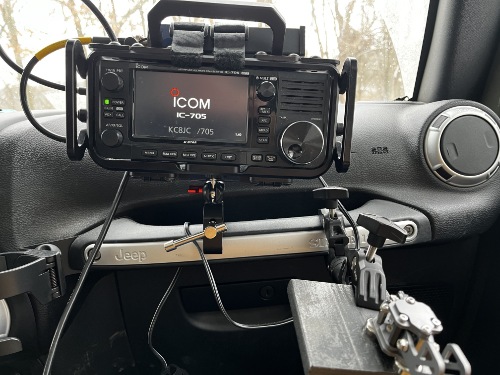
<p>I’ve gotten pretty good with the mobile setup for the IC-705. The clamps that I got for both it and my CW paddle base work really well on the panic bar in the Jeep. I keep the clamps in the Jeep at this point and it makes getting set up a question of 2 or 3 minutes maximum if I’m screwing the whip into the mount on the rear of the Jeep.</p>

<figure><img src="/assets/images/2026/06/02-Jun-2026-Rig.png" alt="IC-705 and paddles on clamps that attach to the grab bar in front of the passenger's seat of the Jeep." /><figcaption>IC-705 and paddles on clamps that attach to the grab bar in front of the passenger's seat of the Jeep.</figcaption></figure>

<p>I got on the air and it was a bit slow. 40M was pretty quiet, but I got a quick 5 before things really slumped. I was wondering if I was getting out, but both the Ham Alert that pings my watch and my website widget showed that I was getting out.</p>

<figure><img src="/assets/images/2026/06/02-Jun-2026-widget.png" alt="KC8JC Blog Widget showing my POTA entity, Frequency, and Mode." /><figcaption>KC8JC Blog Widget showing my POTA entity, Frequency, and Mode.</figcaption></figure>

<p>I moved on over to 20M and saw that things were even worse from a band perspective. The contacts I did make were quiet and faded a lot. I squeaked out 11 contacts in about an hour and that was all the time I had. I felt refreshed!</p>

<h2 id="qso-map">QSO Map</h2>

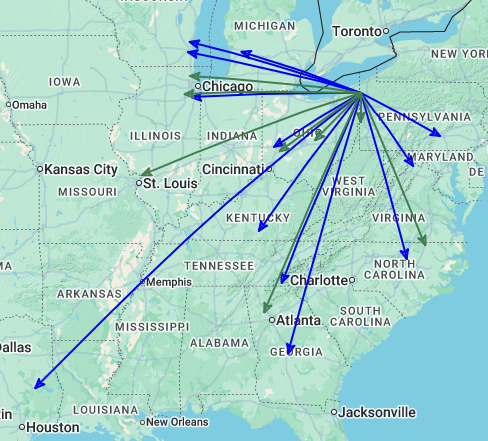
<p>Here’s the QSO Map.</p>

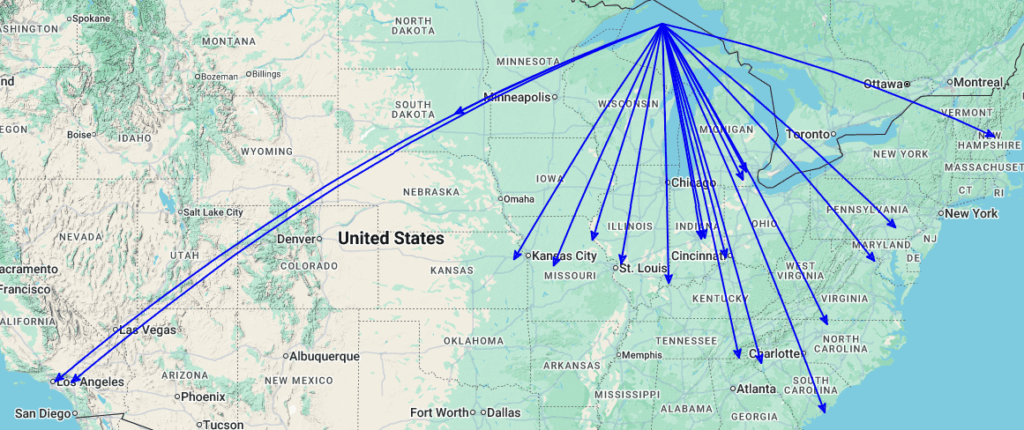
<figure><img src="/assets/images/2026/06/QSOMap-02-Jun-2026.png" alt="QSO Map of the activation of US-9445 on 02-Jun-2026 by KC8JC." /><figcaption>QSO Map of the activation of US-9445 on 02-Jun-2026 by KC8JC.</figcaption></figure>

<p>Not too bad at all!</p>

<h2 id="final">Final</h2>

<p>The past week in our household has been difficult. My dear friend and companion of over 12 years, Dr. Finneas J. Nacho aka The Radio Beagle aka The Nach passed away. For such a small guy, he has left an enormous hole. Getting outside, hiking, mountain biking, and certainly POTA are things that I need right now to get those happy brain chemicals flowing. Espeically MTB and POTA because it’s really hard to think about being sad when you’re flying down some single track going far faster than a dude in his 50s should or are decoding CW from some OP that doesn’t understand that 18 wpm it what feels right today rather than 27. It’s good therapy.</p>

<p>Thanks for reading along and 72!</p>

<figure><img src="/assets/images/2026/06/02-Jun-2026-Trees.png" alt="A stand of beautiful trees seen from next to the Jeep at the nature area." /><figcaption>A stand of beautiful trees seen from next to the Jeep at the nature area.</figcaption></figure>]]></content><author><name>KC8JC</name></author><category term="POTA" /><category term="IC-705" /><category term="Mobile Operating" /><summary type="html"><![CDATA[It didn’t go as planned, but any day with an activation has to be better than one without.]]></summary></entry><entry><title type="html">Silly Website Widget</title><link href="https://www.kc8jc.com/2026/05/18/silly-website-widget/" rel="alternate" type="text/html" title="Silly Website Widget" /><published>2026-05-18T01:00:00-04:00</published><updated>2026-05-18T01:00:00-04:00</updated><id>https://www.kc8jc.com/2026/05/18/silly-website-widget</id><content type="html" xml:base="https://www.kc8jc.com/2026/05/18/silly-website-widget/"><![CDATA[<p>I had a weird thought while I was lying awake waiting to let the dog back in at about 03:00. That thought was an idea for a web widget that I couldn’t implement in Wordpress (well, <em>I</em> couldn’t) so I burned down my entire site for this. It’s silly.</p>

<h2 id="what-is-it">What Is It?</h2>

<p>It was a really simple thought: wouldn’t it be neat to put a little widget on my website to show when I’m on the air for a POTA activation? Just something that says KC8JC is on the air on this mode at this frequency. Go check him out! It didn’t seem like it would be too hard given that the POTA.app site has an API (unsupported) that has all of that data. Why not grab it and go?</p>

<p>My first thought was to do something in PHP but then, over a cup of coffee, I decided that I’d just do it as a javascript function and let it run when the page loads. Why get fancy or weird about it?</p>

<h2 id="so-what-does-it-do">So What Does It Do?</h2>

<p>It’s really simple. This thing just hits the POTA.app API to see if anything comes back. My site is pretty low traffic, so I’m not thinking that this will be any more burden than I put on it when I go to a park and sit there seeing if RBN or POTA is hearing me when I’ve gone 20 minutes without a contact. I try not to get desperate, but I imagine I’m not alone there. If there’s a spot for my call, it shows the mode and frequency. Really, really, <em>brutally</em> simple.</p>

<p>But what if I’m on the air and NOT doing POTA? What then?</p>

<p>Well, why not have it hit PSKReporter and see what comes back? Why not? So I did that too.</p>

<h2 id="wheres-the-code">Where’s The Code?</h2>

<p>This isn’t particularly elegant and I’m putting it here more so I remember what I did than anything else. Also, it’s important to note that I’m using this with Jekyll. If you choose to scoop this up and run with it, put it in the includes folder so that it gets packaged up correctly. I’m still <em>REALLY</em> new to Jekyll so it took me a bit to figure that out. I gotta say, for generating a static site, it’s really neat even if I’m not a ruby guy and I have to keep looking up how to keep stuff up to date so that things work on multiple platforms. Again, that’s a Me Problem.</p>

<p>This isn’t going on Codeberg, I don’t think, but if you promise not to laugh, here it is:</p>

<div class="language-javascript highlighter-rouge"><div class="highlight"><pre class="highlight"><code><span class="o">&lt;</span><span class="nx">div</span> <span class="nx">id</span><span class="o">=</span><span class="dl">"</span><span class="s2">pota-widget</span><span class="dl">"</span> <span class="nx">style</span><span class="o">=</span><span class="dl">"</span><span class="s2">display:none;</span><span class="dl">"</span><span class="o">&gt;</span>
  <span class="o">&lt;</span><span class="nx">div</span> <span class="kd">class</span><span class="o">=</span><span class="dl">"</span><span class="s2">widget widget--pota</span><span class="dl">"</span><span class="o">&gt;</span>
    <span class="o">&lt;</span><span class="nx">h3</span> <span class="kd">class</span><span class="o">=</span><span class="dl">"</span><span class="s2">widget-head</span><span class="dl">"</span><span class="o">&gt;</span><span class="nx">on</span> <span class="nx">the</span> <span class="nx">air</span> <span class="nx">now</span><span class="o">&lt;</span><span class="sr">/h3</span><span class="err">&gt;
</span>    <span class="o">&lt;</span><span class="nx">div</span> <span class="kd">class</span><span class="o">=</span><span class="dl">"</span><span class="s2">pota-spot</span><span class="dl">"</span><span class="o">&gt;</span>
      <span class="o">&lt;</span><span class="nx">div</span> <span class="kd">class</span><span class="o">=</span><span class="dl">"</span><span class="s2">pota-spot__park</span><span class="dl">"</span><span class="o">&gt;</span>
        <span class="o">&lt;</span><span class="nx">span</span> <span class="kd">class</span><span class="o">=</span><span class="dl">"</span><span class="s2">pota-spot__ref</span><span class="dl">"</span> <span class="nx">id</span><span class="o">=</span><span class="dl">"</span><span class="s2">pota-ref</span><span class="dl">"</span><span class="o">&gt;&lt;</span><span class="sr">/span</span><span class="err">&gt;
</span>        <span class="o">&lt;</span><span class="nx">span</span> <span class="kd">class</span><span class="o">=</span><span class="dl">"</span><span class="s2">pota-spot__name</span><span class="dl">"</span> <span class="nx">id</span><span class="o">=</span><span class="dl">"</span><span class="s2">pota-name</span><span class="dl">"</span><span class="o">&gt;&lt;</span><span class="sr">/span</span><span class="err">&gt;
</span>      <span class="o">&lt;</span><span class="sr">/div</span><span class="err">&gt;
</span>      <span class="o">&lt;</span><span class="nx">div</span> <span class="kd">class</span><span class="o">=</span><span class="dl">"</span><span class="s2">pota-spot__freq</span><span class="dl">"</span><span class="o">&gt;</span>
        <span class="o">&lt;</span><span class="nx">span</span> <span class="kd">class</span><span class="o">=</span><span class="dl">"</span><span class="s2">pota-spot__mhz</span><span class="dl">"</span> <span class="nx">id</span><span class="o">=</span><span class="dl">"</span><span class="s2">pota-freq</span><span class="dl">"</span><span class="o">&gt;&lt;</span><span class="sr">/span</span><span class="err">&gt;
</span>        <span class="o">&lt;</span><span class="nx">span</span> <span class="kd">class</span><span class="o">=</span><span class="dl">"</span><span class="s2">pota-spot__mode</span><span class="dl">"</span> <span class="nx">id</span><span class="o">=</span><span class="dl">"</span><span class="s2">pota-mode</span><span class="dl">"</span><span class="o">&gt;&lt;</span><span class="sr">/span</span><span class="err">&gt;
</span>      <span class="o">&lt;</span><span class="sr">/div</span><span class="err">&gt;
</span>      <span class="o">&lt;</span><span class="nx">a</span> <span class="kd">class</span><span class="o">=</span><span class="dl">"</span><span class="s2">pota-spot__link</span><span class="dl">"</span> <span class="nx">id</span><span class="o">=</span><span class="dl">"</span><span class="s2">pota-link</span><span class="dl">"</span>
         <span class="nx">href</span><span class="o">=</span><span class="dl">"</span><span class="s2">#</span><span class="dl">"</span> <span class="nx">target</span><span class="o">=</span><span class="dl">"</span><span class="s2">_blank</span><span class="dl">"</span> <span class="nx">rel</span><span class="o">=</span><span class="dl">"</span><span class="s2">noopener</span><span class="dl">"</span><span class="o">&gt;&lt;</span><span class="sr">/a</span><span class="err">&gt;
</span>    <span class="o">&lt;</span><span class="sr">/div</span><span class="err">&gt;
</span>  <span class="o">&lt;</span><span class="sr">/div</span><span class="err">&gt;
</span><span class="o">&lt;</span><span class="sr">/div</span><span class="err">&gt;
</span>
<span class="o">&lt;</span><span class="nx">script</span><span class="o">&gt;</span>
<span class="p">(</span><span class="nf">function </span><span class="p">()</span> <span class="p">{</span>
  <span class="kd">var</span> <span class="nx">CALLSIGN</span> <span class="o">=</span> <span class="dl">'</span><span class="s1">KC8JC</span><span class="dl">'</span><span class="p">;</span>
  <span class="kd">var</span> <span class="nx">POTA_URL</span> <span class="o">=</span> <span class="dl">'</span><span class="s1">https://api.pota.app/spot/activator</span><span class="dl">'</span><span class="p">;</span>
  <span class="kd">var</span> <span class="nx">PSK_URL</span>  <span class="o">=</span> <span class="dl">'</span><span class="s1">https://retrieve.pskreporter.info/query</span><span class="dl">'</span> <span class="o">+</span>
                 <span class="dl">'</span><span class="s1">?senderCallsign=</span><span class="dl">'</span> <span class="o">+</span> <span class="nx">CALLSIGN</span> <span class="o">+</span>
                 <span class="dl">'</span><span class="s1">&amp;flowStartSeconds=-1800</span><span class="dl">'</span> <span class="o">+</span>
                 <span class="dl">'</span><span class="s1">&amp;rronly=1</span><span class="dl">'</span><span class="p">;</span>

  <span class="kd">function</span> <span class="nf">show</span><span class="p">(</span><span class="nx">ref</span><span class="p">,</span> <span class="nx">name</span><span class="p">,</span> <span class="nx">freqMhz</span><span class="p">,</span> <span class="nx">mode</span><span class="p">,</span> <span class="nx">linkHref</span><span class="p">,</span> <span class="nx">linkText</span><span class="p">)</span> <span class="p">{</span>
    <span class="nb">document</span><span class="p">.</span><span class="nf">getElementById</span><span class="p">(</span><span class="dl">'</span><span class="s1">pota-ref</span><span class="dl">'</span><span class="p">).</span><span class="nx">textContent</span>  <span class="o">=</span> <span class="nx">ref</span><span class="p">;</span>
    <span class="nb">document</span><span class="p">.</span><span class="nf">getElementById</span><span class="p">(</span><span class="dl">'</span><span class="s1">pota-name</span><span class="dl">'</span><span class="p">).</span><span class="nx">textContent</span> <span class="o">=</span> <span class="nx">name</span><span class="p">;</span>
    <span class="nb">document</span><span class="p">.</span><span class="nf">getElementById</span><span class="p">(</span><span class="dl">'</span><span class="s1">pota-freq</span><span class="dl">'</span><span class="p">).</span><span class="nx">textContent</span> <span class="o">=</span> <span class="nx">freqMhz</span> <span class="o">+</span> <span class="dl">'</span><span class="s1"> MHz</span><span class="dl">'</span><span class="p">;</span>
    <span class="nb">document</span><span class="p">.</span><span class="nf">getElementById</span><span class="p">(</span><span class="dl">'</span><span class="s1">pota-mode</span><span class="dl">'</span><span class="p">).</span><span class="nx">textContent</span> <span class="o">=</span> <span class="nx">mode</span><span class="p">;</span>
    <span class="kd">var</span> <span class="nx">link</span>         <span class="o">=</span> <span class="nb">document</span><span class="p">.</span><span class="nf">getElementById</span><span class="p">(</span><span class="dl">'</span><span class="s1">pota-link</span><span class="dl">'</span><span class="p">);</span>
    <span class="nx">link</span><span class="p">.</span><span class="nx">href</span>        <span class="o">=</span> <span class="nx">linkHref</span><span class="p">;</span>
    <span class="nx">link</span><span class="p">.</span><span class="nx">textContent</span> <span class="o">=</span> <span class="nx">linkText</span><span class="p">;</span>
    <span class="nb">document</span><span class="p">.</span><span class="nf">getElementById</span><span class="p">(</span><span class="dl">'</span><span class="s1">pota-widget</span><span class="dl">'</span><span class="p">).</span><span class="nx">style</span><span class="p">.</span><span class="nx">display</span> <span class="o">=</span> <span class="dl">''</span><span class="p">;</span>
  <span class="p">}</span>

  <span class="kd">function</span> <span class="nf">tryPOTA</span><span class="p">()</span> <span class="p">{</span>
    <span class="k">return</span> <span class="nf">fetch</span><span class="p">(</span><span class="nx">POTA_URL</span><span class="p">)</span>
      <span class="p">.</span><span class="nf">then</span><span class="p">(</span><span class="nf">function </span><span class="p">(</span><span class="nx">r</span><span class="p">)</span> <span class="p">{</span>
        <span class="k">if </span><span class="p">(</span><span class="o">!</span><span class="nx">r</span><span class="p">.</span><span class="nx">ok</span><span class="p">)</span> <span class="k">throw</span> <span class="k">new</span> <span class="nc">Error</span><span class="p">(</span><span class="dl">'</span><span class="s1">POTA error - probably my fault...</span><span class="dl">'</span><span class="p">);</span>
        <span class="k">return</span> <span class="nx">r</span><span class="p">.</span><span class="nf">json</span><span class="p">();</span>
      <span class="p">})</span>
      <span class="p">.</span><span class="nf">then</span><span class="p">(</span><span class="nf">function </span><span class="p">(</span><span class="nx">spots</span><span class="p">)</span> <span class="p">{</span>
        <span class="kd">var</span> <span class="nx">mine</span> <span class="o">=</span> <span class="nx">spots</span><span class="p">.</span><span class="nf">filter</span><span class="p">(</span><span class="nf">function </span><span class="p">(</span><span class="nx">s</span><span class="p">)</span> <span class="p">{</span>
          <span class="k">return</span> <span class="nx">s</span><span class="p">.</span><span class="nx">activator</span> <span class="o">&amp;&amp;</span>
                 <span class="nx">s</span><span class="p">.</span><span class="nx">activator</span><span class="p">.</span><span class="nf">toUpperCase</span><span class="p">()</span> <span class="o">===</span> <span class="nx">CALLSIGN</span> <span class="o">&amp;&amp;</span>
                 <span class="o">!</span><span class="nx">s</span><span class="p">.</span><span class="nx">invalid</span><span class="p">;</span>
        <span class="p">});</span>
        <span class="k">if </span><span class="p">(</span><span class="nx">mine</span><span class="p">.</span><span class="nx">length</span> <span class="o">===</span> <span class="mi">0</span><span class="p">)</span> <span class="k">return</span> <span class="kc">false</span><span class="p">;</span>

        <span class="nx">mine</span><span class="p">.</span><span class="nf">sort</span><span class="p">(</span><span class="nf">function </span><span class="p">(</span><span class="nx">a</span><span class="p">,</span> <span class="nx">b</span><span class="p">)</span> <span class="p">{</span>
          <span class="k">return</span> <span class="k">new</span> <span class="nc">Date</span><span class="p">(</span><span class="nx">b</span><span class="p">.</span><span class="nx">spotTime</span><span class="p">)</span> <span class="o">-</span> <span class="k">new</span> <span class="nc">Date</span><span class="p">(</span><span class="nx">a</span><span class="p">.</span><span class="nx">spotTime</span><span class="p">);</span>
        <span class="p">});</span>

        <span class="kd">var</span> <span class="nx">spot</span>    <span class="o">=</span> <span class="nx">mine</span><span class="p">[</span><span class="mi">0</span><span class="p">];</span>
        <span class="kd">var</span> <span class="nx">freqKhz</span> <span class="o">=</span> <span class="nf">parseFloat</span><span class="p">(</span><span class="nx">spot</span><span class="p">.</span><span class="nx">frequency</span><span class="p">);</span>
        <span class="nf">show</span><span class="p">(</span>
          <span class="nx">spot</span><span class="p">.</span><span class="nx">reference</span><span class="p">,</span>
          <span class="nx">spot</span><span class="p">.</span><span class="nx">name</span> <span class="o">||</span> <span class="dl">''</span><span class="p">,</span>
          <span class="p">(</span><span class="nx">freqKhz</span> <span class="o">/</span> <span class="mi">1000</span><span class="p">).</span><span class="nf">toFixed</span><span class="p">(</span><span class="mi">3</span><span class="p">),</span>
          <span class="nx">spot</span><span class="p">.</span><span class="nx">mode</span> <span class="o">||</span> <span class="dl">''</span><span class="p">,</span>
          <span class="dl">'</span><span class="s1">https://pota.app/#/</span><span class="dl">'</span><span class="p">,</span>
          <span class="dl">'</span><span class="s1">view on pota.app →</span><span class="dl">'</span>
        <span class="p">);</span>
        <span class="k">return</span> <span class="kc">true</span><span class="p">;</span>
      <span class="p">});</span>
  <span class="p">}</span>

  <span class="kd">function</span> <span class="nf">tryPSKReporter</span><span class="p">()</span> <span class="p">{</span>
    <span class="k">return</span> <span class="nf">fetch</span><span class="p">(</span><span class="nx">PSK_URL</span><span class="p">)</span>
      <span class="p">.</span><span class="nf">then</span><span class="p">(</span><span class="nf">function </span><span class="p">(</span><span class="nx">r</span><span class="p">)</span> <span class="p">{</span>
        <span class="k">if </span><span class="p">(</span><span class="o">!</span><span class="nx">r</span><span class="p">.</span><span class="nx">ok</span><span class="p">)</span> <span class="k">throw</span> <span class="k">new</span> <span class="nc">Error</span><span class="p">(</span><span class="dl">'</span><span class="s1">PSKReporter error - probably my fault...</span><span class="dl">'</span><span class="p">);</span>
        <span class="k">return</span> <span class="nx">r</span><span class="p">.</span><span class="nf">text</span><span class="p">();</span>
      <span class="p">})</span>
      <span class="p">.</span><span class="nf">then</span><span class="p">(</span><span class="nf">function </span><span class="p">(</span><span class="nx">xml</span><span class="p">)</span> <span class="p">{</span>
        <span class="kd">var</span> <span class="nx">doc</span>     <span class="o">=</span> <span class="k">new</span> <span class="nc">DOMParser</span><span class="p">().</span><span class="nf">parseFromString</span><span class="p">(</span><span class="nx">xml</span><span class="p">,</span> <span class="dl">'</span><span class="s1">text/xml</span><span class="dl">'</span><span class="p">);</span>
        <span class="kd">var</span> <span class="nx">reports</span> <span class="o">=</span> <span class="nb">Array</span><span class="p">.</span><span class="k">from</span><span class="p">(</span><span class="nx">doc</span><span class="p">.</span><span class="nf">querySelectorAll</span><span class="p">(</span><span class="dl">'</span><span class="s1">receptionReport</span><span class="dl">'</span><span class="p">));</span>
        <span class="k">if </span><span class="p">(</span><span class="nx">reports</span><span class="p">.</span><span class="nx">length</span> <span class="o">===</span> <span class="mi">0</span><span class="p">)</span> <span class="k">return</span> <span class="kc">false</span><span class="p">;</span>

        <span class="c1">// Sort spots with newest first</span>
        <span class="nx">reports</span><span class="p">.</span><span class="nf">sort</span><span class="p">(</span><span class="nf">function </span><span class="p">(</span><span class="nx">a</span><span class="p">,</span> <span class="nx">b</span><span class="p">)</span> <span class="p">{</span>
          <span class="k">return</span> <span class="nf">parseInt</span><span class="p">(</span><span class="nx">b</span><span class="p">.</span><span class="nf">getAttribute</span><span class="p">(</span><span class="dl">'</span><span class="s1">flowStartSeconds</span><span class="dl">'</span><span class="p">),</span> <span class="mi">10</span><span class="p">)</span> <span class="o">-</span>
                 <span class="nf">parseInt</span><span class="p">(</span><span class="nx">a</span><span class="p">.</span><span class="nf">getAttribute</span><span class="p">(</span><span class="dl">'</span><span class="s1">flowStartSeconds</span><span class="dl">'</span><span class="p">),</span> <span class="mi">10</span><span class="p">);</span>
        <span class="p">});</span>

        <span class="kd">var</span> <span class="nx">newest</span>  <span class="o">=</span> <span class="nx">reports</span><span class="p">[</span><span class="mi">0</span><span class="p">];</span>
        <span class="kd">var</span> <span class="nx">freqHz</span>  <span class="o">=</span> <span class="nf">parseInt</span><span class="p">(</span><span class="nx">newest</span><span class="p">.</span><span class="nf">getAttribute</span><span class="p">(</span><span class="dl">'</span><span class="s1">frequency</span><span class="dl">'</span><span class="p">),</span> <span class="mi">10</span><span class="p">);</span>
        <span class="kd">var</span> <span class="nx">mode</span>    <span class="o">=</span> <span class="nx">newest</span><span class="p">.</span><span class="nf">getAttribute</span><span class="p">(</span><span class="dl">'</span><span class="s1">mode</span><span class="dl">'</span><span class="p">)</span> <span class="o">||</span> <span class="dl">''</span><span class="p">;</span>
        <span class="kd">var</span> <span class="nx">count</span>   <span class="o">=</span> <span class="nx">reports</span><span class="p">.</span><span class="nx">length</span><span class="p">;</span>

        <span class="nf">show</span><span class="p">(</span>
          <span class="dl">''</span><span class="p">,</span>
          <span class="dl">'</span><span class="s1">heard by </span><span class="dl">'</span> <span class="o">+</span> <span class="nx">count</span> <span class="o">+</span> <span class="dl">'</span><span class="s1"> station</span><span class="dl">'</span> <span class="o">+</span> <span class="p">(</span><span class="nx">count</span> <span class="o">!==</span> <span class="mi">1</span> <span class="p">?</span> <span class="dl">'</span><span class="s1">s</span><span class="dl">'</span> <span class="p">:</span> <span class="dl">''</span><span class="p">),</span>
          <span class="p">(</span><span class="nx">freqHz</span> <span class="o">/</span> <span class="mi">1000000</span><span class="p">).</span><span class="nf">toFixed</span><span class="p">(</span><span class="mi">3</span><span class="p">),</span>
          <span class="nx">mode</span><span class="p">,</span>
          <span class="dl">'</span><span class="s1">https://pskreporter.info/pskmap.html?callsign=</span><span class="dl">'</span> <span class="o">+</span> <span class="nx">CALLSIGN</span><span class="p">,</span>
          <span class="dl">'</span><span class="s1">view on pskreporter →</span><span class="dl">'</span>
        <span class="p">);</span>
        <span class="k">return</span> <span class="kc">true</span><span class="p">;</span>
      <span class="p">});</span>
  <span class="p">}</span>

  <span class="c1">// Try POTA first; Try PSKReporter if not spotted there.</span>
  <span class="c1">// All failures are silent and the widget stays hidden if both come up empty - NICE!.</span>
  <span class="nf">tryPOTA</span><span class="p">()</span>
    <span class="p">.</span><span class="nf">then</span><span class="p">(</span><span class="nf">function </span><span class="p">(</span><span class="nx">found</span><span class="p">)</span> <span class="p">{</span>
      <span class="k">if </span><span class="p">(</span><span class="o">!</span><span class="nx">found</span><span class="p">)</span> <span class="k">return</span> <span class="nf">tryPSKReporter</span><span class="p">();</span>
    <span class="p">})</span>
    <span class="p">.</span><span class="k">catch</span><span class="p">(</span><span class="nf">function </span><span class="p">()</span> <span class="p">{</span>
      <span class="nf">tryPSKReporter</span><span class="p">().</span><span class="k">catch</span><span class="p">(</span><span class="nf">function </span><span class="p">()</span> <span class="p">{});</span>
    <span class="p">});</span>
<span class="p">})();</span>
<span class="o">&lt;</span><span class="sr">/script</span><span class="err">&gt;
</span>
</code></pre></div></div>

<p>That’s all there is to it. If it doesn’t find anything then there’s nothing on the site. If it does, then there should be. So go test it with a callsign that’s on the air when you’re messing around with it. Oh, and change the callsign in the code above or you’ll only see when I’m on the air. I’m not sure that’s what you want. Good luck with it!</p>

<h2 id="final">Final</h2>

<p>Hobby of hobbies indeed! I’m not sure that this was the best reason to burn down my site and start over, but I’m really starting to think critically about the tech I use. Why on earth am I using a database and a bunch of nonsense when my site is really a static reference and series of stories about a dude and his radio? I’m trying to get rid of complexity where I can and this is a pretty great place to start. Besides, it makes hacking together things like this more attractive because there isn’t the overhead of the monolith that is Wordpress.</p>

<p>And hey, maybe static sites are just QRP websites? I didn’t think of it that way until just now.</p>

<p>I hope this was at least amusing and maybe you’ll use it to catch me on an activation some day soon!</p>

<p>72 de KC8JC</p>]]></content><author><name>KC8JC</name></author><category term="Software" /><category term="POTA" /><category term="Hobby Of Hobbies" /><summary type="html"><![CDATA[I had a weird thought while I was lying awake waiting to let the dog back in at about 03:00. That thought was an idea for a web widget that I couldn’t implement in Wordpress (well, I couldn’t) so I burned down my entire site for this. It’s silly.]]></summary></entry><entry><title type="html">Is This Thing On?</title><link href="https://www.kc8jc.com/2026/05/12/is-this-thing-on/" rel="alternate" type="text/html" title="Is This Thing On?" /><published>2026-05-12T01:00:00-04:00</published><updated>2026-05-12T01:00:00-04:00</updated><id>https://www.kc8jc.com/2026/05/12/is-this-thing-on</id><content type="html" xml:base="https://www.kc8jc.com/2026/05/12/is-this-thing-on/"><![CDATA[<p>A new look and feel. Revel in my capricious nature!</p>

<h2 id="new-coat-of-paint">New Coat of Paint?</h2>

<p>I had a weird dream last night where I wanted to put something on the front page of my radio blog that would put up spot information for me when I’m in the field and either the <a href="https://pota.app">POTA site</a> or the <a href="https://www.reversebeacon.net">Reverse Beacon Network</a> caught me in the field. It would be the kind of web widget that I would turn on or off depending on circumstances. Like, for a local park? Great! Advertising that I’m on vacation in a foreign land? Maybe less good? I don’t know. I didn’t really think about it that deeply but what did occur to me is that I’d have to do it as  Wordpress plug-in or widget or something and I haven’t messed around with that stuff in  really, really long time.  Honestly? I didn’t want to start now. So instead, I did something really silly.</p>

<h2 id="total-reboot">Total Reboot</h2>

<p>I decided while I was walking the dog that I’d just torch the Wordpress install and blast everything into Jekyll and call it even. So that’s what I did. I played around with some ideas I had for a theme and dug around in my archive of stuff that I’d messed with before for other sites and pulled this out. It’s a fun pseudo-cyberpunk look and if I don’t like it in a week? I’ll change it. And it will be less of a pain that dealing with Wordpress. Not that I’m down on Wordpress! It’s great for people who need that kind of stuff. I just…don’t. I’m good with a text editor and rsync.</p>

<p>Hopefully, the RSS feed will work for everyone and things will be OK on that front. We’ll find out the hard way!</p>

<p>If you notice broken stuff, either email me at my callsign at this domain or grab me on Mastodon at @KC8JC@Mastodon.Radio</p>

<p>73 de KC8JC</p>]]></content><author><name>KC8JC</name></author><category term="Administrative" /><summary type="html"><![CDATA[A new look and feel. Revel in my capricious nature!]]></summary></entry><entry><title type="html">A Simple Script</title><link href="https://www.kc8jc.com/2026/05/06/a-simple-script/" rel="alternate" type="text/html" title="A Simple Script" /><published>2026-05-06T16:42:16-04:00</published><updated>2026-05-06T16:42:16-04:00</updated><id>https://www.kc8jc.com/2026/05/06/a-simple-script</id><content type="html" xml:base="https://www.kc8jc.com/2026/05/06/a-simple-script/"><![CDATA[<p><!DOCTYPE html PUBLIC "-//W3C//DTD HTML 4.0 Transitional//EN" "http://www.w3.org/TR/REC-html40/loose.dtd"><br />
<!-- wp:heading --><html><body></p>
<h2 class="wp-block-heading">Utilities Are Good For You</h2>
<p><!-- /wp:heading --></p>
<p><!-- wp:paragraph --></p>
<p>Every week, I participate in <a href="https://winlinkwednesday.com">Winlink Wednesday</a>. I do my check-ins with <a href="https://getpat.io">pat</a>. Once a month, they as for a weather snapshot to go with the check-in. This isn't particularly onerous, but I have top open my weather widget and then type out the weather. That seems like the kind of thing one could automate, right?</p>
<p><!-- /wp:paragraph --></p>
<p><!-- wp:paragraph --></p>
<p>Enter <a href="wttr.in">wttr.in</a>.</p>
<p><!-- /wp:paragraph --></p>
<p><!-- wp:paragraph --></p>
<p>With a simple curl command, you can pull your local weather from the internet in a billion different formats. But the one thing it won't do is put the wind's direction in simple text. No. It give arrows. And that? That's not great for a copy/paste. It's also not great for me because I have to think about what the arrow is trying to tell me. So what to do?</p>
<p><!-- /wp:paragraph --></p>
<p><!-- wp:heading --></p>
<h2 class="wp-block-heading">20 Minute Of Free Time</h2>
<p><!-- /wp:heading --></p>
<p><!-- wp:paragraph --></p>
<p>I had 20 minutes. I started to poke at making a bash script that would grab the weather, look for the arrow, parse it out and make it text. Then dump it to the console. Easy enough!</p>
<p><!-- /wp:paragraph --></p>
<p><!-- wp:code --></p>
<pre class="wp-block-code"><code>curl -s 'wttr.in/?format=%25T%20%25C%20%25w%20%25t&amp;u' \
| sed 's/↖/NW/g; s/↗/NE/g; s/↙/SW/g; s/↘/SE/g; s/←/W/g; s/→/E/g; s/↑/N/g; s/↓/S/g'</code></pre>
<p><!-- /wp:code --></p>
<p><!-- wp:paragraph --></p>
<p><em>The arrows in the code block above are rendering in an unexpected way and I don't care to wrestle with Wordpress right now.</em></p>
<p><!-- /wp:paragraph --></p>
<p><!-- wp:paragraph --></p>
<p>Is this the most elegant solution? Probably not. Does it work? Yes! That's the definition of all shell scripts, right? If it works, you run it. And probably never change it.</p>
<p><!-- /wp:paragraph --></p>
<p><!-- wp:heading --></p>
<h2 class="wp-block-heading">But That Only Took 5 Minutes</h2>
<p><!-- /wp:heading --></p>
<p><!-- wp:paragraph --></p>
<p>I had more minutes left! What to do?!</p>
<p><!-- /wp:paragraph --></p>
<p><!-- wp:paragraph --></p>
<p>Well, first, I made a silly parser to grab the most recent bluesky post from the local parks district because they use that to share when the mountain bike trails are opened or closed. I got crazy with that and used emojis and other nonsense. I'm not posting that here because if you don't ride mountain bikes at that specific park, it's not useful at all. And I'm not convinced it's useful to me except when pared with a script I'll run once or twice a day.</p>
<p><!-- /wp:paragraph --></p>
<p><!-- wp:heading --></p>
<h2 class="wp-block-heading">That Was Dumb…But Still 10 Minutes To Kill!</h2>
<p><!-- /wp:heading --></p>
<p><!-- wp:paragraph --></p>
<p>So what if - hear me out - I had the band conditions in there somewhere too? What if I grabbed stuff from <a href="https://www.hamqsl.com">Ham QSL</a> and dumped that to the console too? What if I even took a really poor stab at listing band conditions? Well, with 10 minutes and an open text editor, this is what I built:</p>
<p><!-- /wp:paragraph --></p>
<p><!-- wp:code --></p>
<pre class="wp-block-code"><code>echo "━━━━━━━━━━━━━━━━━━━━━━━━━━━━━━━━"
 echo "📻 BAND CONDITIONS..."
 echo "━━━━━━━━━━━━━━━━━━━━━━━━━━━━━━━━"
 curl -s https://www.hamqsl.com/solarxml.php \
 | awk '
 /&lt;kp&gt;/        {gsub(/.*&lt;kp&gt;|&lt;\/kp&gt;.*/, ""); kp=$0+0}
 /&lt;aindex&gt;/    {gsub(/.*&lt;aindex&gt;|&lt;\/aindex&gt;.*/, ""); ap=$0+0}
 /&lt;solarflux&gt;/ {gsub(/.*&lt;solarflux&gt;|&lt;\/solarflux&gt;.*/, ""); sfi=$0+0}

 END {
   cond=(kp&lt;3?"Quiet":(kp&lt;5?"Unsettled":"Storm"));

   band80 = (kp&gt;=6?"Poor":(kp&gt;=5?"Fair":"Good"));
   band40 = (kp&gt;=6?"Poor":(kp&gt;=5?"Fair":"Good"));
   band20 = (kp&gt;=6?"Poor":(kp&gt;=4?"Fair":"Good"));
   band15 = (kp&gt;=5?"Poor":(kp&gt;=3?"Fair":(kp==4?"Fair":"Good")));
   band10 = (kp&gt;=5?"Poor":(kp&gt;=3?"Poor":"Fair"));
    printf "Kp:%.1f Ap:%d SFI:%d %s | ", kp, ap, sfi, cond;
    printf "80m:%s 40m:%s 20m:%s 15m:%s 10m:%s\n",
      band80, band40, band20, band15, band10;
 }'
 echo "━━━━━━━━━━━━━━━━━━━━━━━━━━━━━━━━"</code></pre>
<p><!-- /wp:code --></p>
<p><!-- wp:paragraph --></p>
<p>I was having all kinds of trouble with getting the XML parsed and I wasn't willing to use a real language so…awk to the rescue, I guess? I could do this in a much cleaner way and dumping it to the internet like this is probably irresponsible. But KC1SRI asked nicely on Mastodon, so here it is.</p>
<p><!-- /wp:paragraph --></p>
<p><!-- wp:heading --></p>
<h2 class="wp-block-heading">Final</h2>
<p><!-- /wp:heading --></p>
<p><!-- wp:paragraph --></p>
<p>That's it. This is what happens when a dude has 20 minutes and an open terminal and a couple of really half baked ideas. This thing will probably turn into a big, long script that dumps out calendar stuff too just because I can.</p>
<p><!-- /wp:paragraph --></p>
<p><!-- wp:paragraph --></p>
<p>73 and thanks for reading!</p>
<p><!-- /wp:paragraph --><br />
</body></html></p>]]></content><author><name>KC8JC</name></author><category term="Computers" /><category term="Software" /><category term="Tricks" /><summary type="html"><![CDATA[Utilities Are Good For You Every week, I participate in Winlink Wednesday. I do my check-ins with pat. Once a month, they as for a weather snapshot to go with the check-in. This isn't particularly onerous, but I have top open my weather widget and then type out the weather. That seems like the kind of thing one could automate, right? Enter wttr.in. With a simple curl command, you can pull your local weather from the internet in a billion different formats. But the one thing it won't do is put the wind's direction in simple text. No. It give arrows. And that? That's not great for a copy/paste. It's also not great for me because I have to think about what the arrow is trying to tell me. So what to do? 20 Minute Of Free Time I had 20 minutes. I started to poke at making a bash script that would grab the weather, look for the arrow, parse it out and make it text. Then dump it to the console. Easy enough! curl -s 'wttr.in/?format=%25T%20%25C%20%25w%20%25t&amp;u' \ | sed 's/↖/NW/g; s/↗/NE/g; s/↙/SW/g; s/↘/SE/g; s/←/W/g; s/→/E/g; s/↑/N/g; s/↓/S/g' The arrows in the code block above are rendering in an unexpected way and I don't care to wrestle with Wordpress right now. Is this the most elegant solution? Probably not. Does it work? Yes! That's the definition of all shell scripts, right? If it works, you run it. And probably never change it. But That Only Took 5 Minutes I had more minutes left! What to do?! Well, first, I made a silly parser to grab the most recent bluesky post from the local parks district because they use that to share when the mountain bike trails are opened or closed. I got crazy with that and used emojis and other nonsense. I'm not posting that here because if you don't ride mountain bikes at that specific park, it's not useful at all. And I'm not convinced it's useful to me except when pared with a script I'll run once or twice a day. That Was Dumb…But Still 10 Minutes To Kill! So what if - hear me out - I had the band conditions in there somewhere too? What if I grabbed stuff from Ham QSL and dumped that to the console too? What if I even took a really poor stab at listing band conditions? Well, with 10 minutes and an open text editor, this is what I built: echo "━━━━━━━━━━━━━━━━━━━━━━━━━━━━━━━━" echo "📻 BAND CONDITIONS..." echo "━━━━━━━━━━━━━━━━━━━━━━━━━━━━━━━━" curl -s https://www.hamqsl.com/solarxml.php \ | awk ' /&lt;kp&gt;/ {gsub(/.*&lt;kp&gt;|&lt;\/kp&gt;.*/, ""); kp=$0+0} /&lt;aindex&gt;/ {gsub(/.*&lt;aindex&gt;|&lt;\/aindex&gt;.*/, ""); ap=$0+0} /&lt;solarflux&gt;/ {gsub(/.*&lt;solarflux&gt;|&lt;\/solarflux&gt;.*/, ""); sfi=$0+0}]]></summary></entry><entry><title type="html">My Time With Pat…So Far</title><link href="https://www.kc8jc.com/2026/03/18/my-time-with-patso-far/" rel="alternate" type="text/html" title="My Time With Pat…So Far" /><published>2026-03-18T10:37:25-04:00</published><updated>2026-03-18T10:37:25-04:00</updated><id>https://www.kc8jc.com/2026/03/18/my-time-with-patso-far</id><content type="html" xml:base="https://www.kc8jc.com/2026/03/18/my-time-with-patso-far/"><![CDATA[<p><!DOCTYPE html PUBLIC "-//W3C//DTD HTML 4.0 Transitional//EN" "http://www.w3.org/TR/REC-html40/loose.dtd"><br />
<!-- wp:heading --><html><body></p>
<h2 class="wp-block-heading">Pat Is My Friend</h2>
<p><!-- /wp:heading --></p>
<p><!-- wp:paragraph --></p>
<p>I've been over the topic of my move from Windows and Windows-only ham software in the past, so I won't rehash it. For minimal context I will say that there are no Microsoft products in my shack (aside from my Microsoft Surface Go 2 that runs Ubuntu). I would love to say that I only use FOSS but that's not true and might not ever be true. There are always going to be trade-offs. I will always choose FOSS when there is a good option for my use case.</p>
<p><!-- /wp:paragraph --></p>
<p><!-- wp:paragraph --></p>
<p>That said, my love for <a href="https://getpat.io">pat</a> has only grown over the past couple of years that I've been using it. Why? Because it's simple and incredibly versatile. I can run it as a process in the background and access it through a browswer or I can run it from the command line like the 1337 h@XX0r that I am. That level of flexibility cannot be matched by other software for Winlink work.</p>
<p><!-- /wp:paragraph --></p>
<p><!-- wp:heading --></p>
<h2 class="wp-block-heading">Making It Easier</h2>
<p><!-- /wp:heading --></p>
<p><!-- wp:paragraph --></p>
<p>The one thing that I find challenging is remembering all of the things that pat can do. In service of my memory, I made a couple of notes that I'm going to memorialize here. The first of these is getting pat set up to use the web client.</p>
<p><!-- /wp:paragraph --></p>
<p><!-- wp:paragraph --></p>
<p>I wrote a nifty little script that I call "startpat.sh". I drop it into my /user/local/bin and call it a day. I have this on all of my radio related computers. It is simply:</p>
<p><!-- /wp:paragraph --></p>
<p><!-- wp:paragraph --></p>
<p><code>#!/bin/bash </code></p>
<p><!-- /wp:paragraph --></p>
<p><!-- wp:paragraph --></p>
<p><code>rigctl -m 2 M PKTUSB 3000 </code></p>
<p><!-- /wp:paragraph --></p>
<p><!-- wp:paragraph --></p>
<p><code>pat –listen “ardop,varahf” http</code></p>
<p><!-- /wp:paragraph --></p>
<p><!-- wp:paragraph --></p>
<p>This script assumes that I have rigctld running somewhere and I almost always do if I'm running my radio. I won't go into that here as I cover that in detail elsewhere on the blog. It also assumes that the modem, Ardop or VARA HF, is running as well. The rigctl command is putting things into data mode and setting the passband. Then the script sets pat up to use either Ardop or VARA HF as a modem and spin up the http listener.</p>
<p><!-- /wp:paragraph --></p>
<p><!-- wp:paragraph --></p>
<p>With that script running, I go to http://localhost:8080 and I get the pat web interface. From there, I can check my mail or send more mail or manage the mail with a very nice, if simple, GUI. This is a total win and probably best for a lot of people who are new to Winlink operations. The pat manual covers the features nicely.</p>
<p><!-- /wp:paragraph --></p>
<p><!-- wp:heading --></p>
<h2 class="wp-block-heading">The Command Line</h2>
<p><!-- /wp:heading --></p>
<p><!-- wp:paragraph --></p>
<p>The thing that makes pat very powerful for me, however, is using it from the command line. I find that using a trackpad in the field is a nightmare and I often forget my Bluetooth mouse. Being able to call pat from the command line and do All Of The Things is great!</p>
<p><!-- /wp:paragraph --></p>
<p><!-- wp:paragraph --></p>
<p>The first thing I might do is compose a message.</p>
<p><!-- /wp:paragraph --></p>
<p><!-- wp:paragraph --></p>
<p><code>pat compose</code></p>
<p><!-- /wp:paragraph --></p>
<p><!-- wp:paragraph --></p>
<p>Based on your settings, that kick off some interactive prompts. It asks for the source, destination, and subject of the email. It also asks if you want to keep the messge on a peer to peer transmission. I've never done that and I probably should. Once you've answered those questions, you get dumped to text editor. For me, that's vim. I write my message and when I quit, I get to tell pat to go ahead and queue it up for sending. Very easy.</p>
<p><!-- /wp:paragraph --></p>
<p><!-- wp:paragraph --></p>
<p>One thing that the web UI does is compile and maintain a list of stations for connections. That includes the callsign, frequency, bandwidth, and mode. From the command line, assuming an internet connection, you can get a list of gateways like this:</p>
<p><!-- /wp:paragraph --></p>
<p><!-- wp:paragraph --></p>
<p><code>pat rmslist -s -m varahf -b '40m' &gt; pat.txt</code></p>
<p><!-- /wp:paragraph --></p>
<p><!-- wp:paragraph --></p>
<p>What does that do? Let's break it down.</p>
<p><!-- /wp:paragraph --></p>
<p><!-- wp:paragraph --></p>
<p><code>pat rmslist</code> will give you a listing of all of the registered Winlink gateways.</p>
<p><!-- /wp:paragraph --></p>
<p><!-- wp:paragraph --></p>
<p>-s will sort them by distance from your station (as defined in your configuration).</p>
<p><!-- /wp:paragraph --></p>
<p><!-- wp:paragraph --></p>
<p>-m sets the mode. In this example that is VARA HF.</p>
<p><!-- /wp:paragraph --></p>
<p><!-- wp:paragraph --></p>
<p>-b allows you to specify which band you want. 40-meters in this case.</p>
<p><!-- /wp:paragraph --></p>
<p><!-- wp:paragraph --></p>
<p>In this example, I dump all of the results into a text file called pat.txt. When I open that text file, I can see all of the stations that I can try to connect with along with a handy string that I will need to copy for command line use:</p>
<p><!-- /wp:paragraph --></p>
<p><!-- wp:paragraph --></p>
<p><code>varahf:///WW2MI?bw=2750&amp;freq=7102.1</code></p>
<p><!-- /wp:paragraph --></p>
<p><!-- wp:paragraph --></p>
<p>That string that is given in response to the rmslist command is exactly what is needed to connect pat from the command line.</p>
<p><!-- /wp:paragraph --></p>
<p><!-- wp:paragraph --></p>
<p><code>pat connect "varahf:///WW2MI?bw=2750&amp;freq=7102.1"</code></p>
<p><!-- /wp:paragraph --></p>
<p><!-- wp:paragraph --></p>
<p>This kicks off an attempt to connect to WW2MI on 7.1021 MHz using the VARA HF modem with a bandwidth of 2750. After issuing the command, all there is to do is wait for it to connect and then watch as it sends all messages that are in the outbox and then pull down any messages from the server.</p>
<p><!-- /wp:paragraph --></p>
<p><!-- wp:paragraph --></p>
<p>With all of my mail downloaded, I can read it interactively with:</p>
<p><!-- /wp:paragraph --></p>
<p><!-- wp:paragraph --></p>
<p><code>pat read</code></p>
<p><!-- /wp:paragraph --></p>
<p><!-- wp:paragraph --></p>
<p>That gets me into some serious Pine and Mutt nostalgia. It's glorious to read email from the command line. Everyone should have that experience! For real… It's cool!</p>
<p><!-- /wp:paragraph --></p>
<p><!-- wp:heading --></p>
<h2 class="wp-block-heading">Quick Trick?</h2>
<p><!-- /wp:heading --></p>
<p><!-- wp:paragraph --></p>
<p>I'll be honest, I usually get my mail using telnet.</p>
<p><!-- /wp:paragraph --></p>
<p><!-- wp:paragraph --></p>
<p><code>pat connect telnet</code></p>
<p><!-- /wp:paragraph --></p>
<p><!-- wp:paragraph --></p>
<p>Since I'm almost always checking in to a net when there are plenty of other people doing the same thing, I like to get out of the way. Getting my mail with telnet means that the radio isn't used at all. It all goes across the internet. That's just a thing I do sometimes to make things move faster.</p>
<p><!-- /wp:paragraph --></p>
<p><!-- wp:paragraph --></p>
<p>I'd never do that to send a message to something like Winlink Wednesday, for example, as it defeats the purpose. I need to be sure that my station can connect over the air.</p>
<p><!-- /wp:paragraph --></p>
<p><!-- wp:heading --></p>
<h2 class="wp-block-heading">Final</h2>
<p><!-- /wp:heading --></p>
<p><!-- wp:paragraph --></p>
<p>Since I moved to pat, I've not looked back. Winlink Express was a nightmare for me and I've no desire to revisit it. pat lets me work my way on any platform I use (Linux or MacOS).</p>
<p><!-- /wp:paragraph --></p>
<p><!-- wp:paragraph --></p>
<p>There are plenty of other tricks and I've looked at writing wrapper scripts for some of the things I do, but I don't want to rely too heavily on scripts. I like to know how to use the software so that I can if I'm somewhere else like the club site or at another station.</p>
<p><!-- /wp:paragraph --></p>
<p><!-- wp:paragraph --></p>
<p>pat works flawlessly on MacOS and on my Linux systems. I can't really say enough good stuff about it but I will close by saying that I don't think about it much and I think that says a lot. The less I have to think about using a piece of software, the better it is.</p>
<p><!-- /wp:paragraph --></p>
<p><!-- wp:paragraph --></p>
<p>And if you're wondering if pat can do something with regard to Winlink, the answer is going to be Yes. Dig around in the manual or ask <code>pat help</code> as it is quite thorough.</p>
<p><!-- /wp:paragraph --></p>
<p><!-- wp:paragraph --></p>
<p>73 and thanks for reading!</p>
<p><!-- /wp:paragraph --><br />
</body></html></p>]]></content><author><name>KC8JC</name></author><category term="Software" /><category term="Winlink" /><summary type="html"><![CDATA[Pat Is My Friend I've been over the topic of my move from Windows and Windows-only ham software in the past, so I won't rehash it. For minimal context I will say that there are no Microsoft products in my shack (aside from my Microsoft Surface Go 2 that runs Ubuntu). I would love to say that I only use FOSS but that's not true and might not ever be true. There are always going to be trade-offs. I will always choose FOSS when there is a good option for my use case. That said, my love for pat has only grown over the past couple of years that I've been using it. Why? Because it's simple and incredibly versatile. I can run it as a process in the background and access it through a browswer or I can run it from the command line like the 1337 h@XX0r that I am. That level of flexibility cannot be matched by other software for Winlink work. Making It Easier The one thing that I find challenging is remembering all of the things that pat can do. In service of my memory, I made a couple of notes that I'm going to memorialize here. The first of these is getting pat set up to use the web client. I wrote a nifty little script that I call "startpat.sh". I drop it into my /user/local/bin and call it a day. I have this on all of my radio related computers. It is simply: #!/bin/bash rigctl -m 2 M PKTUSB 3000 pat –listen “ardop,varahf” http This script assumes that I have rigctld running somewhere and I almost always do if I'm running my radio. I won't go into that here as I cover that in detail elsewhere on the blog. It also assumes that the modem, Ardop or VARA HF, is running as well. The rigctl command is putting things into data mode and setting the passband. Then the script sets pat up to use either Ardop or VARA HF as a modem and spin up the http listener. With that script running, I go to http://localhost:8080 and I get the pat web interface. From there, I can check my mail or send more mail or manage the mail with a very nice, if simple, GUI. This is a total win and probably best for a lot of people who are new to Winlink operations. The pat manual covers the features nicely. The Command Line The thing that makes pat very powerful for me, however, is using it from the command line. I find that using a trackpad in the field is a nightmare and I often forget my Bluetooth mouse. Being able to call pat from the command line and do All Of The Things is great! The first thing I might do is compose a message. pat compose Based on your settings, that kick off some interactive prompts. It asks for the source, destination, and subject of the email. It also asks if you want to keep the messge on a peer to peer transmission. I've never done that and I probably should. Once you've answered those questions, you get dumped to text editor. For me, that's vim. I write my message and when I quit, I get to tell pat to go ahead and queue it up for sending. Very easy. One thing that the web UI does is compile and maintain a list of stations for connections. That includes the callsign, frequency, bandwidth, and mode. From the command line, assuming an internet connection, you can get a list of gateways like this: pat rmslist -s -m varahf -b '40m' &gt; pat.txt What does that do? Let's break it down. pat rmslist will give you a listing of all of the registered Winlink gateways. -s will sort them by distance from your station (as defined in your configuration). -m sets the mode. In this example that is VARA HF. -b allows you to specify which band you want. 40-meters in this case. In this example, I dump all of the results into a text file called pat.txt. When I open that text file, I can see all of the stations that I can try to connect with along with a handy string that I will need to copy for command line use: varahf:///WW2MI?bw=2750&amp;freq=7102.1 That string that is given in response to the rmslist command is exactly what is needed to connect pat from the command line. pat connect "varahf:///WW2MI?bw=2750&amp;freq=7102.1" This kicks off an attempt to connect to WW2MI on 7.1021 MHz using the VARA HF modem with a bandwidth of 2750. After issuing the command, all there is to do is wait for it to connect and then watch as it sends all messages that are in the outbox and then pull down any messages from the server. With all of my mail downloaded, I can read it interactively with: pat read That gets me into some serious Pine and Mutt nostalgia. It's glorious to read email from the command line. Everyone should have that experience! For real… It's cool! Quick Trick? I'll be honest, I usually get my mail using telnet. pat connect telnet Since I'm almost always checking in to a net when there are plenty of other people doing the same thing, I like to get out of the way. Getting my mail with telnet means that the radio isn't used at all. It all goes across the internet. That's just a thing I do sometimes to make things move faster. I'd never do that to send a message to something like Winlink Wednesday, for example, as it defeats the purpose. I need to be sure that my station can connect over the air. Final Since I moved to pat, I've not looked back. Winlink Express was a nightmare for me and I've no desire to revisit it. pat lets me work my way on any platform I use (Linux or MacOS). There are plenty of other tricks and I've looked at writing wrapper scripts for some of the things I do, but I don't want to rely too heavily on scripts. I like to know how to use the software so that I can if I'm somewhere else like the club site or at another station. pat works flawlessly on MacOS and on my Linux systems. I can't really say enough good stuff about it but I will close by saying that I don't think about it much and I think that says a lot. The less I have to think about using a piece of software, the better it is. And if you're wondering if pat can do something with regard to Winlink, the answer is going to be Yes. Dig around in the manual or ask pat help as it is quite thorough. 73 and thanks for reading!]]></summary></entry></feed>