Amateur radio is all about fun and exploration. It’s about play. We learn a lot from doing things. We may not learn what we set out to learn, but we learn something and that’s not nothing. If that sounds like a long way around to talking about this post, then the tone is set properly. This is all about taking the long way around…
It Starts As Something Simple
I was cleaning up my office and came across my Digirig Mobile. I’ve used it a bit with my truSDX and another rig just to see what I could do with it. There were occasions to plug it in a few times while camping just for grins and it seemed like a useful piece of gear to have around. But there it was, sitting on a shelf being boring when it could be entertaining!
With the Digirig in hand, I turned around and saw my BTECH UV-25x2 UHF/VHF rig. This little guy was my first shack radio back when I was initially licensed. It’s not a feature rich radio, but when I upgraded (in a big way) to an IC-7100, I didn’t feel bad about putting the UV-25 in the Jeep. That’s where it lived for a long time. Then I swapped it out for the IC-7100 which then fell into a state of not really working and now the IC-7100 is waiting to be boxed up and repaired while the UV-25 is sitting on my desk. Circle of Life? Not exactly.
What would it take to get the Digirig working with the UV-25 and why would it involve buying yet another cable? Because ham radio, that’s why. That might also have been the easiest question to answer in this endeavor.
After some reading online, it seemed way easier to chuck a few bucks at the Digirig crew and get an Official Cable than to wire one up in the spare time that I was planning to burn on getting all of this stuff working. A few days of waiting and the cable was in hand. Let’s plug in and get on the air!
Let The Long Journey Begin!
I plugged the Digirig into the Mac and through the magic of Pure Data I was able to hear the NOAA station through the rig and confirm that the audio chain to the Mac was working. Step Zero was ready! But boy was that signal hot. Really hot. Red hot. Disturbingly hot. This probably wouldn’t be a big deal. Maybe. Shouldn’t be. And yet.
With the rig dialed almost to nothing and the Mac’s input attenuated to almost nothing, the signal was clear. That seemed like Good Enough™.
Direwolf
I’ve run Direwolf on the Mac for some time. I use it when I want to do a little packet radio on Net105 or anywhere else. I’ve got a solid config file and everything works the way I need it to. Running it with two rigs on the same machine meant making a second config. The combined config worked just fine and I’m posting the Digirig/UV-25 portion here so I can find it later:
#===== CHANNEL  — APRS IGate (DigiRig, UV-25) =====
ADEVICE plughw:CARD=digirig,DEV=0
ACHANNELS 1
CHANNEL 0
MYCALL KC8JC-10
MODEM 1200
PTT /dev/serial/by-id/usb-Silicon_Labs_CP2102N_USB_to_UART_Bridge_Controller_b44497deb1c3ec11808ca6f2d297222e-if00-port0 RTS
TXDELAY 50
FULLDUP OFF

#===== IGate (applies globally, not per-channel) =====
IGSERVER noam.aprs2.net
IGLOGIN KC8JC-10 PASSCODEGOESHERE
IGTXVIA 0 WIDE1-1

#===== Control Ports (unchanged) =====
AGWPORT 8000
KISSPORT 8001

#===== TEST Beacon =====
#PBEACON delay=0:30 every=30 symbol="I&" overlay=G lat=XX^XX.XXN long=XXX^XX.XXW comment="APRS IGate test - KC8JC" via=WIDE1-1,WIDE2-1
#PBEACON sendto=IG delay=0:30 every=60 symbol="I&" overlay=T lat=XX^XX.XXN long=XXX^XX.XXW comment="APRS IGate test - KC8JC" via=WIDE1-1,WIDE2-1
You may notice RIGHT AWAY (if you’re paying close attention) that the ADEVICE line is defining the device using ALSA terminology. That’s because where we start is almost never where we end. So just consider yourself extra clever and we’ll come back to this.
APRS Passcode
Oh! To be on the APRS network with something like Direwolf and expect anything to come or go across the network, you need a passcode. That’s the IGLOGIN in the config. Go to this site: https://apps.magicbug.co.uk/passcode/ and you can generate one with your callsign.
Digirig Issues
Receiving worked really well. I sent a message from my TH-D74 and Direwolf decoded it on the command line. That felt great! Huge success! But that’s only halfway there. I needed to find a way to get the transceiver to do the transmitting part.
There is a simple utility CM108 that will flip the PTT on and off in 1 second intervals for testing. I fired it up and waited for my UV-25 to do…anything. It didn’t. Fine. Maybe there was something else at play. As it turns out, there was something (a lot of somethings, really) that I didn’t know.
A funny thing about the Digirig MOBILE is that it doesn’t handle PTT the way that the other Digirigs do. So when you run the CM108 test program you’ll find that the pins it tries to activate just don’t work. I will admit freely that I tinkered with this for a good hour and spent about 90 minutes digging through forum posts and being frustrated by search engines that no long work before I gave in and asked the robot. The robot found a relevant piece of documentation and showed clearly that PTT had to be done via the /dev/serial device.
Hoo boy.
I’m sure there was an easier way to find this, but the rig itself is kinda niche for this application and this is already pretty niche stuff. Used to be that would make it easier to find, but no more. With that addition to the config, I was getting the UV-25 to transmit! Yay!
By the way, the best way to test everything is to make sure your KISSPORT is set and then use kissutil like this:
KC8JC-10>APDW18,WIDE1-1,WIDE2-1::KC8JC-9 :Hello from server{01
That will send a message from the server, out the transceiver, and to the APRS enabled HT on the desk. It’s pretty thrilling to hear the TH-D74 come to life and read off the call of the sending station after a solid decode!
A Few Modifications Myself
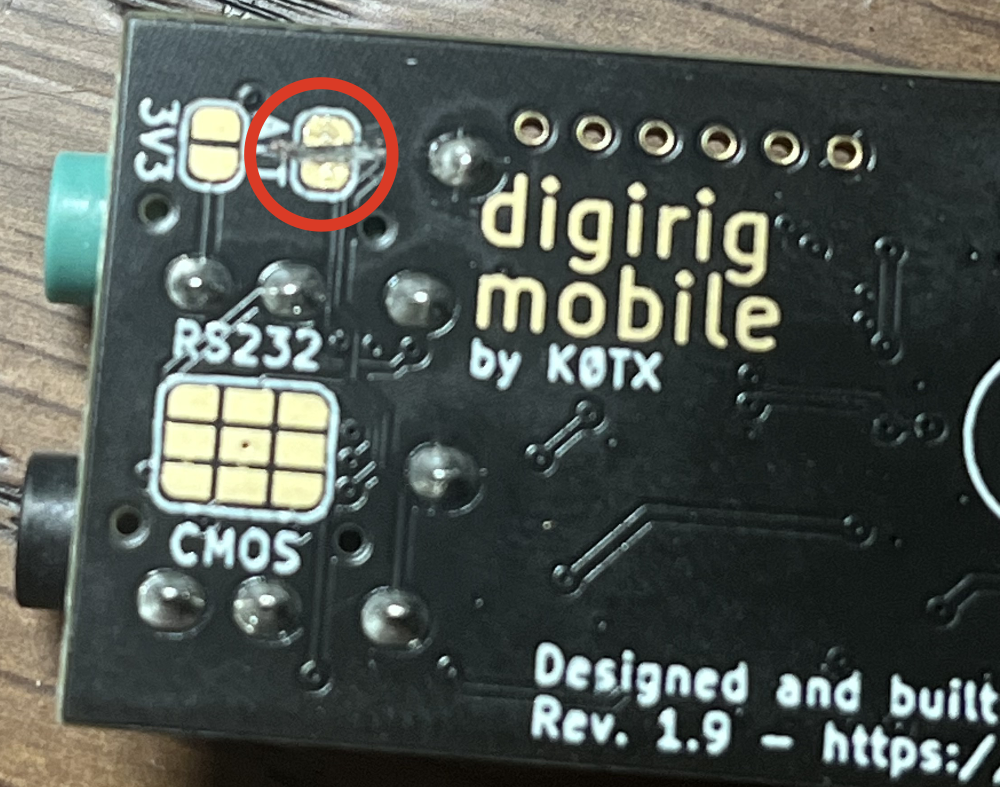
But boy was Direwolf upset about the audio levels. Like, really upset. Every message that came in over RF was talking about how maxed out it was even though the decode was fine. Well, as it turns out, the Digirig is known to have some heat for certain rigs. There’s even -20dB attenuator built into the board! It just requires a little physical modification to activate it.
This video shows how it’s done:
https://digirig.net/digirig-mobile-rev-1-9/
Yeah, you open it up, slide out the little board, get a really sharp blade and cut the trace between the two big solder pads.
Yikes.
For a guy like me who uses tools specifically so I don’t break stuff, this was intimidating. It took a long time and very gentle strokes with the blade before I finally got down deep enough to cut the trace. With the two pads measuring an overload of ohms (no continuity) the little guy went back together and WOW did it make a difference. What was once very hot was totally manageable. You really have to resepect engineering things like this into something. Kudos to Digirig (Denis K0TX)!
So Here’s The Thing
Running an APRS Gateway on my daily driver Mac Mini seemed like A Really Bad Idea®. I have a server that I do little experiments on that is pretty stable. That seemed like a better solution. Of course, in my house, if it runs Linux, it’s running Debian Unstable (except for my field tablet that is still running Ubuntu because it works and I’m not made of time). It took almost nothing to get Direwolf up and running. The config was already good and everything I needed was in Unstable. This was probably the step that required the least thought and effort.
Some ALSA Notes
Checking to see that your device is there can be accomplished with a simple:
arecord -l
That will give you:
card 1: Device [USB PnP Sound Device], device 0: USB Audio [USB Audio]
You can do the same thing with aplay to get output devices.
Now, to survive a reboot or upgrade and keep from having to screw around with audio device renumbering, this is a good approach. Start by running lsusb. You’ll get something like this in the mix if you have the Digirig Mobile installed:
Bus 001 Device 012: ID 0d8c:013c C-Media Electronics, Inc. CM108 Audio Controller
The ID is the important part. Creating a udev rule will make it all boot-proof:
sudo nano /etc/udev/rules.d/85-digirig.rules

SUBSYSTEM=="sound", ATTRS{idVendor}=="xxxx", ATTRS{idProduct}=="yyyy", ATTR{id}="digirig"
In the ID listed above, 0d8c:013c would be xxxx and yyyy in the SUBSYSTEM rule.
Then…
sudo udevadm control --reload-rules
sudo udevadm trigger
And run arecord -l to make sure you see the “digirig” or whatever you used in the list. This will make sure that reboots and upgrades won’t go messing with devices in your configs. Works over here anyway!
The Local Scene
One might wonder why one would even think of putting up a gateway around these parts. Well, a couple of years back when I was getting started on Winlink, I found that the online resources would have me believe that I live in a packet radio desert. This seems highly unlikely given my proximity to DX Engineering, the number of ham clubs around, and the ham radio plates I see on cars around these parts. But, the web resources wouldn’t mislead me, would they?
Much like with the Meshtastic experiments I’ve been doing, the only way to know what’s out there is to listen. My Meshtastic node that sits here listening all day and night has pulled together a serious list of nodes. With Direwolf running, I left the radio on all night and found that there was a lot of traffic. Plenty of mobile stations and a few repeaters that were hitting me from multiple directions. One of them being VERY CLOSE.
So close, in fact, that when sending a message directed at my server from my TH-D74 that is two stories below the antenna to the rig, it was grabbed by the other repeater and sent to me over the network before my own station could grab it. In fact, the most maddening part of testing was trying to figure out if the other station was going to snag the message first. Or so it seems. I need to learn a lot more before I can be certain of that, but I can say that it was like flipping a coin to see who would receive the message and deliver it.
I’ll probably look the owner up and send over a friendly email. I like to know my local hams! And I have a thought as to where the antenna might be…
Practice
I had forgotten so much about how to use my TH-D74 for APRS that it’s embarassing. I’d not sent a message in a long time and I’d totally forgotten how to navigate the interface. The TH-D74 is the kind of radio that has more features than a ham deserves and an amazing way to navigate to them - once you know all of your most frequently used menu numbers! But to maintain any level of expertise, one must practice and I had not. There were more than a few frustrating moments that could have been avoided if only the muscle memory were maintained. With a new gateway and all that, there’s little excuse not to send a couple of messages a week to stay in practice.
The same goes for the Mobilnkd TNC4 + IC-705 + aprs.fi app combo. The 705 did eventually end up sending packets and I did remember that there were little things to do like go into the Mobilnkd app before getting started with anything else and setting the PTT to Multiplex on the Audio Output Settings. Forgetting that cost about 15 minutes of staring at the screen and wondering.
This is why Winlink Wednesday is so important. If you want any credibility for being useful in an emergency, everything must be well practiced. I’m not claiming to be useful here, but it’d be nice to have some fluency, ya know?
Final
There’s more to do. I have Direwolf running as a service so it should be good to go on that front. It will survive the inevitable reboots and that much is tested.
I’m going to start carrying my TH-D74 with me and monitoring APRS traffic. That and sending stuff to my station at home as often as I can remember. I’ll also invite any and all hams to send stuff my way and see if it works. I know the internet connection is good and that it will transmit to radios that it has heard since starting. A few weeks of pushing traffic around will have me almost convinced it’s working.
If there’s anything you see here that looks WRONG go ahead and drop me an email. My callsign at this domain will get it to me. Or you can find me on Mastodon @KC8JC@Mastodon.radio.
Thanks for reading and 73!